



Three weeks ago, a fintech client messaged me at 11 PM. Their site migration had gone live that morning, and organic traffic was down 43% by dinner. No rollback plan. No monitoring queries ready. Just panic and a CEO demanding answers.
This happens all the time. Companies spend months planning redesigns, platform switches, or domain consolidations, then watch their search visibility crater because nobody mapped out the technical SEO migration playbook until launch day.
Most migration disasters come down to operational sloppiness: test cases not ranked by revenue impact, rollback triggers undefined before launch, and monitoring queries that catch problems when it's too late to fix them easily.
Why migrations kill traffic (and it's rarely about redirects)
Everyone fixates on redirect chains and status codes, but the real migration killers live elsewhere. Your rendering changes. Your internal linking structure shifts. Your URL parameters behave differently. Your sitemap logic breaks.
A furniture retailer switched from Magento to custom-built last year. Their redirects were perfect—every old URL mapped cleanly to its new home. Traffic still tanked 38% in two weeks. The culprit? Their new platform rendered product descriptions client-side, and Googlebot couldn't see half their content. Nobody caught it because they tested with browser tools, not actual crawling.
Another common pattern: companies test their staging environment extensively, then deploy to production with different CDN settings, different caching rules, or different server configurations. Your staging site passes every test. Your live site fails in ways you never anticipated.
The operational breakdown usually follows this sequence: Marketing owns content migration. Engineering owns the platform transition. DevOps owns infrastructure. SEO gets consulted occasionally but doesn't own technical validation. Each team validates their piece, but nobody validates the complete system end-to-end from Googlebot's perspective.
This fragmentation creates blind spots everywhere. Marketing checks that content moved correctly but doesn't verify rendering. Engineering confirms the application works but doesn't check crawl behavior. DevOps ensures servers respond but doesn't validate response headers for search engines.
Building your prioritized test case framework
Start with revenue, not traffic. A mid-sized retailer might have 50,000 indexed pages, but probably 500 drive 80% of organic revenue. Those 500 pages become your Priority 1 test cases.
Stop losing visibility in search results.
GoSeofy helps you monitor, analyze, and improve your SEO performance with ease.
- Comprehensive keyword tracking
- Backlink quality monitoring
- Real-time SEO performance reports
No credit card required
| Priority Level | Test Schedule | Target Pages | Focus Areas |
|---|---|---|---|
| Priority 1 | Daily for 30 days | Top 500 revenue-driving pages | Revenue conversion, rankings positions 1-3 |
| Priority 2 | Weekly for 60 days | Traffic sustainers | Qualified traffic, positions 4-10 with potential |
| Priority 3 | Monthly for 90 days | Infrastructure validators | Technical functionality, crawlability |
Priority 1 - Revenue drivers (test daily for 30 days):
-
Top 500 pages by organic revenue
-
Category pages that drive conversions
-
High-margin product pages
-
Pages ranking position 1-3 for money keywords
Priority 2 - Traffic sustainers (test weekly for 60 days):
-
Blog posts driving qualified traffic
-
Comparison pages
-
FAQ sections ranking for informational queries
-
Pages ranking position 4-10 that could improve
Priority 3 - Infrastructure validators (test monthly for 90 days):
-
XML sitemap generation
-
Robots.txt accessibility
-
Canonical tag consistency
-
Pagination handling
For each priority level, you need specific test cases, not vague checks. "Verify products work" isn't a test case. "Confirm product ID 48291 renders description text within 3 seconds for Googlebot user agent" is.
A home services company recently migrated 12,000 location pages. Instead of testing all equally, they identified 47 pages that drove 62% of leads. Those 47 got individual test cases covering everything from schema markup to internal link counts. The other 11,953 pages got batch-tested for basic functionality.
Your test cases need to check both positive and negative conditions. The page should return 200 status. But it should also NOT return soft 404 signals, NOT have noindex tags, NOT block resources that affect rendering.
Setting rollback triggers that actually work
Most rollback plans are fantasy. "If traffic drops significantly, we'll roll back." That's not a plan. Real rollback triggers need specific thresholds, time windows, and decision owners.
The four-tier rollback framework:
Immediate rollback (within 2 hours):
-
404 errors on more than 10% of Priority 1 pages
-
Search Console showing "Couldn't fetch" for homepage
-
Complete indexation block (robots.txt or server-level)
-
Database connection failures affecting crawlability
Day 1 rollback (within 24 hours):
-
Organic traffic down more than 50% compared to same day previous week
-
Rendering failures on more than 25% of tested pages
-
Critical schema markup not appearing in structured data tool
-
Core Web Vitals failing for majority of priority pages
Week 1 rollback (days 2-7):
-
Organic traffic consistently down 30%+ daily
-
Search Console Coverage errors exceeding 20% of submitted URLs
-
Rankings dropped more than 5 positions for majority of tracked keywords
-
Crawl budget consumed but important pages not being crawled
Week 2 evaluation (days 8-14):
-
Conversion rate from organic down more than 25%
-
Indexed pages in Search Console dropping more than 15%
-
Important pages showing "Discovered - currently not indexed"
-
Mobile usability errors affecting more than 100 pages
Each trigger needs an owner. The "organic traffic down 50%" trigger might belong to the SEO lead. The "database connection failures" trigger belongs to engineering. When triggers hit, the owner decides—no committee meetings, no executive escalation.
Monitoring queries that catch problems early
Generic Analytics dashboards won't catch migration problems fast enough. You need specific monitoring queries running against multiple data sources, comparing pre-migration baselines to post-migration reality.
Search Console queries (run daily):
Page indexation status: Compare: Pages indexed 30 days ago vs today Flag if: Drop exceeds 10% of baseline Specific query: Coverage report filtered to "Valid" status
Crawl anomalies: Compare: Server errors last 30 days vs last 7 days Flag if: Spike exceeds 3x baseline Specific query: Crawl Stats report, Response codes
Log file queries (run every 6 hours for first week):
Googlebot behavior: Metric: Unique pages crawled by Googlebot Compare: Same day previous week vs today Flag if: Decrease exceeds 30%
Response time degradation: Metric: Average response time for Googlebot requests Compare: Pre-migration average vs current Flag if: Increase exceeds 500ms
Analytics queries (run hourly for first 48 hours):
Landing page performance: Dimension: Landing page Metric: Sessions from organic search Compare: Hour-over-hour, week-over-week Flag if: Any Priority 1 page drops more than 40%
The monitoring stack that caught issues for a recent B2B migration:
-
Custom Slack bot pulling Search Console API every 4 hours
-
Log file parser checking Googlebot crawls every 2 hours
-
BigQuery scheduled queries comparing traffic patterns
-
Uptime monitoring specifically for Googlebot user agent
They caught a CDN configuration issue within 6 hours of launch. Googlebot was getting different content than regular users due to edge caching rules. Would've taken weeks to spot without specific monitoring.
The 90-day supervision timeline
First 24 hours: Crisis detection mode. Check everything every hour. Your entire technical team should be on standby. This isn't paranoid—it's when catastrophic issues surface.
-
Hours 0-6
Monitor all Priority 1 pages for immediate failures
-
Hours 6-12
Check Search Console for crawl errors and indexation blocks
-
Hours 12-18
Analyze log files for unusual Googlebot behavior patterns
-
Hours 18-24
Validate core conversion paths and revenue-driving pages
Days 2-7: Pattern recognition phase. Daily checks on all Priority 1 test cases. Look for trends, not individual data points. A single bad day means nothing. Three bad days means investigation.
Days 8-30: Stabilization period. Weekly deep dives into Search Console data. Compare crawl patterns, indexation rates, and ranking movements. Most recoverable issues surface here.
Days 31-60: Recovery validation. Biweekly analysis of whether early problems are resolving. Search engines need time to reprocess. Some ranking volatility is normal. Consistent decline is not.
Days 61-90: Performance benchmark. Monthly comparison to pre-migration baselines. By day 90, you should be back to baseline or understanding exactly why you're not.
An enterprise client migrated 2.3 million URLs last summer. Their 90-day timeline caught issues at every checkpoint:
-
Day 1
Canonical tags pointing to staging environment (fixed immediately)
-
Day 9
Mobile pages failing Core Web Vitals (CSS loading issue)
-
Day 34
Blog subdirectory getting crawled 70% less (internal linking problem)
-
Day 67
Product pages recovering rankings but category pages still struggling
Without structured monitoring, they would've assumed "migration penalty" and waited for magical recovery.
Common failures that structured monitoring catches
The redirect chain maze happens when your redirects work individually but create chains when combined. Old URL → New URL works. But Old URL → Intermediate URL → New URL → Final URL destroys link equity. Monitoring query: Check redirect paths for all Priority 1 pages, flag any chain longer than one hop.
Soft 404 syndrome occurs when your pages return 200 status but have no useful content. Common with filtered category pages or out-of-stock products. Search Console flags these eventually, but you'll catch them faster by monitoring pages with less than 200 words of main content text.
The JavaScript rendering gap emerges when your content loads fine in browsers but fails for search engines. An electronics retailer lost rankings for 8,000 product pages because their new framework required JavaScript for price display. Googlebot saw products without prices and devalued them.
Parameter handling chaos strikes when your URL parameters multiply. Filtering, sorting, and tracking parameters can create infinite URL variations of the same content. One client went from 50,000 indexed URLs to 400,000 because their new platform didn't handle parameters correctly. Their crawl budget got consumed by junk URLs while important pages went stale.
Geographic targeting confusion happens with international migrations. A company moving from .com/uk/ to .co.uk forgot to update hreflang tags. Google started showing UK pages to US searchers. Traffic didn't drop, but conversions crashed because visitors saw prices in pounds.
These failures share common characteristics: they're invisible in standard testing, they compound over time, and they're much easier to prevent than fix after launch.
Building your migration command center
The migration command center isn't a physical room—it's an operational structure that keeps everyone aligned when things go sideways. You need clear communication channels, defined decision rights, and shared visibility into key metrics.
Your command center needs five components:
Here's a simple visual of the command center workflow.
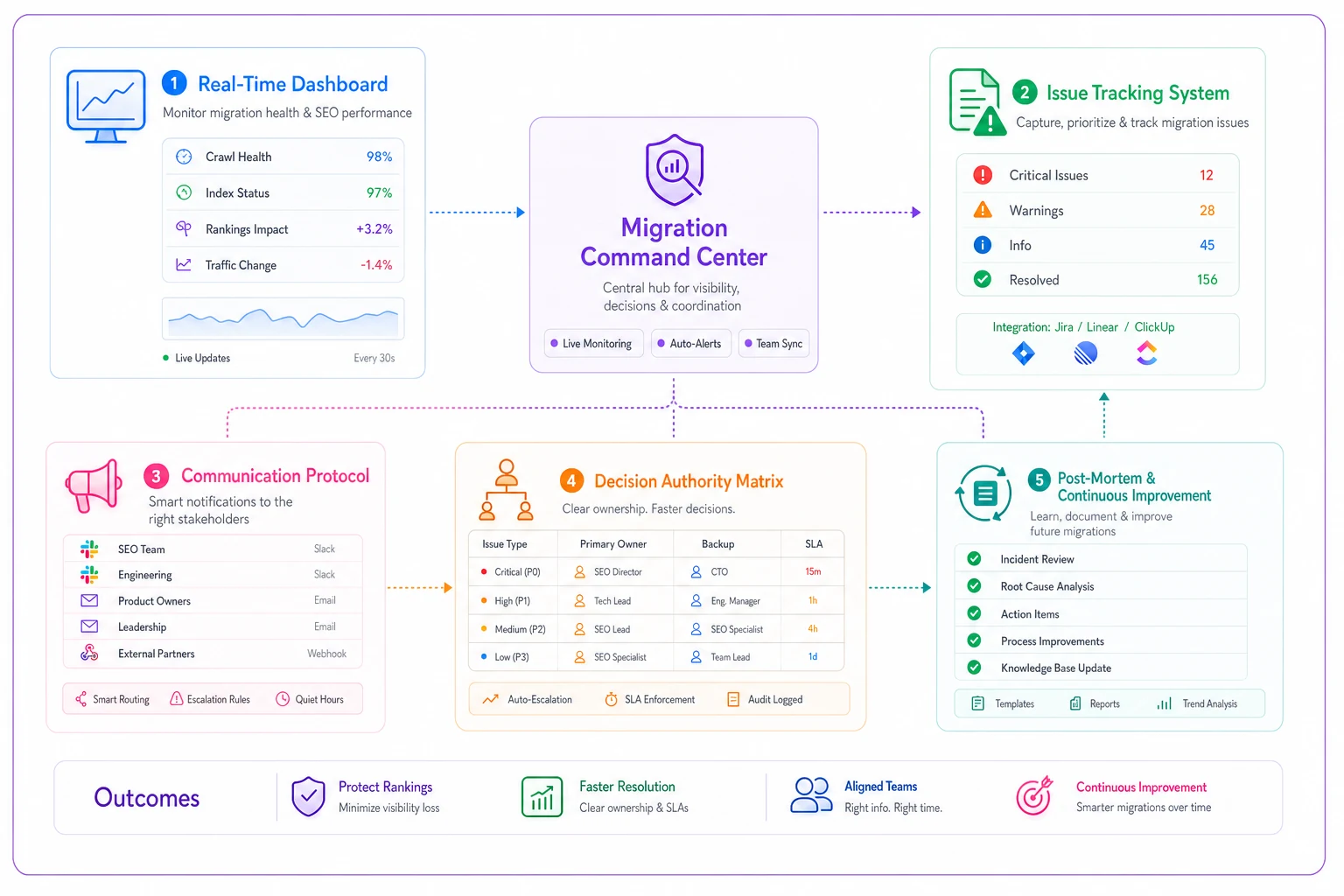
Real-time dashboard Pull your Priority 1 metrics into a single view. Traffic, crawl stats, index coverage, and ranking samples. Everyone from engineering to executives should see the same numbers. No cherry-picking data to support different narratives.
Issue tracking system Not everything is a crisis. You need triage levels: Critical (rollback trigger), High (fix within 24 hours), Medium (fix within 72 hours), Low (fix within a week). Each issue needs an owner, status, and resolution timeline.
Communication protocol Who gets notified when triggers hit? How fast do they need to respond? A financial services firm established their protocol: Critical issues ping the migration lead immediately, High issues get a Slack notification within 15 minutes, Medium issues go into the morning standup.
Decision authority matrix The SEO lead can decide to implement emergency redirects. Only the CTO can authorize a full rollback. The marketing director owns communication to stakeholders. Define this before launch, not during a crisis.
Post-mortem process Every issue that triggers an alert needs a post-mortem, even if quickly resolved. What broke? Why didn't we catch it in testing? How do we prevent it next time? A retailer's post-mortems from their last migration became the checklist for their next one.
Each component serves a specific purpose during crisis moments when clear thinking becomes difficult and blame-shifting starts.
Operational automation that prevents migration disasters
Manual monitoring works but doesn't scale. Smart operations teams build automation that catches issues before humans notice them.
Start with automated crawl comparisons. Schedule daily crawls of your Priority 1 URLs, comparing key elements to your baseline: title tags, meta descriptions, H1s, canonical tags, schema markup, internal link counts. A 20% change in any element triggers an alert.
Log file analysis automation provides faster feedback than Search Console. Parse your logs every hour, looking for Googlebot behavior changes. Sudden drops in crawl rate, spikes in response time, or new error patterns trigger immediate notifications.
Some migrations benefit from automated test execution. A travel site built Selenium scripts for their top 100 landing pages. Every hour, the scripts verified that search forms worked, prices displayed, and critical content rendered. When their migration broke the flight search widget, they knew within 45 minutes.
Response header monitoring catches subtle but damaging issues. Check that your pages return correct cache headers, vary headers, and encoding headers. One misconfigured cache header can prevent search engines from seeing fresh content for weeks.
The automation stack doesn't replace human judgment—it amplifies human attention by filtering noise and highlighting genuine problems that require intervention.
The difference between recovery and permanent damage
Not all migration damage is temporary. Some mistakes create permanent or long-lasting impacts that no amount of monitoring can fully reverse.
Temporary problems (usually recover within 90 days):
-
Redirect implementation delays
-
Crawl budget inefficiencies
-
Rendering delays
-
Mobile usability issues
-
Server response time problems
Long recovery problems (3-12 months):
-
Major internal linking changes
-
URL structure overhauls
-
Content consolidation without proper signals
-
Domain changes without proper preparation
Potentially permanent damage:
-
Losing historical URL equity through improper redirects
-
Deleting pages that had valuable backlinks
-
Changing content focus dramatically
-
Breaking established entity associations
A legal firm learned this the hard way. They consolidated 500 city-specific pages into 50 state pages, thinking it would strengthen their content. They lost local rankings in 450 cities and never recovered them. The local intent signals built over years couldn't be rebuilt.
Understanding this difference changes how you approach risk. Some gambles aren't worth taking, regardless of potential upside.
Your pre-launch validation checklist
Before you flip the switch, validate these components:
Technical foundation:
-
[ ] Staging environment matches production configuration
-
[ ] CDN rules tested with Googlebot user agent
-
[ ] SSL certificates valid and properly configured
-
[ ] Server response times under 200ms for priority pages
-
[ ] Database queries optimized for crawler traffic
Monitoring infrastructure:
-
[ ] Search Console API integration working
-
[ ] Log file parsing automated
-
[ ] Analytics tracking verified on new platform
-
[ ] Uptime monitoring configured for Googlebot
-
[ ] Alert thresholds set and tested
Rollback readiness:
-
[ ] Rollback triggers documented and assigned
-
[ ] Previous version backed up and accessible
-
[ ] DNS change procedures documented
-
[ ] Database rollback scripts tested
-
[ ] CDN cache purge process ready
Team alignment:
-
[ ] Command center roles assigned
-
[ ] Communication channels established
-
[ ] Decision authority matrix approved
-
[ ] On-call schedule for first 72 hours
-
[ ] Escalation paths defined
This checklist prevents the "we thought someone else was handling that" moments that turn minor issues into major disasters.
Making migration monitoring sustainable
The intensive monitoring described here isn't sustainable forever, but it builds the foundation for ongoing operational excellence.
After 90 days, transition to steady-state monitoring. Keep the automated systems running but reduce manual checks. Your Priority 1 pages still get weekly validation. Everything else moves to monthly.
Document everything that broke and why. Your next migration—and there will be one—benefits from this archaeology. The patterns repeat: CDN issues, rendering problems, parameter handling, internal linking. Each migration teaches you what your specific stack tends to break.
Build institutional knowledge. The person who manages your next migration might not be the person who managed this one. Your runbooks, test cases, and monitoring queries become organizational assets, not individual expertise.
Consider establishing migration standards for your organization. Maximum rollback time. Minimum testing coverage. Required monitoring infrastructure. Make these non-negotiable, regardless of timeline pressure or budget constraints.
Most companies treat migrations as one-time events rather than recurring operational challenges that can be systematized and improved.
Beyond the technical: managing migration psychology
The technical SEO migration playbook handles the operational side, but human factors often determine success. Stakeholders panic when traffic dips 10% on day two. Executives want explanations for normal volatility. Teams point fingers when issues surface.
Set expectations explicitly. Show stakeholders historical migration patterns—the initial dip, the gradual recovery, the stabilization timeline. When they understand the pattern, they're less likely to demand emergency fixes for normal fluctuations.
Create transparency without overwhelming detail. A daily email with three metrics (traffic change, major issues
Ready to elevate your search rankings?
Join 5,000+ businesses using GoSeofy to increase organic traffic, optimize content, and outperform competitors online.