


The fastest way to waste budget on SEO tooling isn't buying the wrong vendor. It's buying three vendors that do roughly the same thing, none of them fully, and then having nobody own any of them. Mid‑market teams — call it 15 to 30 people, usually a blend of in‑house specialists and an agency or two — hit this wall constantly. Someone bought a rank tracker in 2022. The agency brought their own crawler. A data analyst wired up a half‑working attribution model in a BI tool. Now there are four "sources of truth" and three monthly invoices nobody wants to defend in budget review.
This guide is about fixing the mental model before you fix the stack. Rather than comparing products, we'll break down SEO software categories by the job they actually do, the pain each one removes, how you'd measure whether it's working, and the two or three things worth testing before you sign anything. No vendor names, no rankings — because the right answer depends entirely on your team shape and your data maturity.
If your team is dealing with budget freezes or a hiring slowdown, the prioritization logic here pairs directly with our take on how SEO teams should prioritize, automate and protect organic revenue when hiring slows. Tooling decisions and headcount decisions are usually the same conversation.
Why categories matter more than features
Feature lists lie. Almost every SEO platform now claims to do rank tracking, crawling, backlink analysis, and "AI content." On paper they all overlap. In practice, each tool is genuinely good at one or two things and mediocre at the rest — the mediocre parts exist to keep you from leaving.
What you see across mixed in‑house/agency setups is that the overlap is exactly where money leaks. Two tools both crawl your site, so you pay twice for crawling and end up with two conflicting issue counts. The real skill is deciding which category each tool owns in your stack, and deliberately switching off the overlapping features elsewhere so your team stops arguing about whose number is right.
The eight categories at a glance
The table below maps each category to the specific pain it solves and who on a mid-market team actually relies on it day to day. Worth scanning before going deeper — it helps clarify where the real budget decisions live.
Stop losing visibility in search results.
GoSeofy helps you monitor, analyze, and improve your SEO performance with ease.
- Comprehensive keyword tracking
- Backlink quality monitoring
- Real-time SEO performance reports
No credit card required
| Category | Primary pain it solves | Who leans on it most |
|---|---|---|
| Rank tracking | "Are we moving for the terms that matter, by segment?" | SEO leads, agency reporting |
| Backlink risk & monitoring | "Is our link profile picking up toxic or anomalous activity?" | In‑house SEO, risk owners |
| Technical crawlers | "What's broken in crawl/index at scale?" | Technical SEOs, engineers |
| Content governance | "Who owns what page, and is it decaying?" | Content ops, editors |
| SEO data‑observability | "Can I trust the GSC/GA joins feeding reports?" | Analysts, data eng |
| Content research | "What should we write and in what cluster?" | Strategists, writers |
| Analytics / attribution | "Did SEO actually drive revenue?" | Growth, finance‑facing SEO |
| Automation / orchestration | "How do we stop doing all of this by hand?" | Ops leads, platform owners |
Now the detail. For each, I'll give the job, the KPIs worth watching, and the shortlist tests that separate a demo from an actual purchase decision.
1. Rank tracking
The job: Tell you where you rank, for which terms, in which locations and devices, segmented in a way that maps to your business — not just a flat list of 500 keywords.
The mistake teams make here is treating rank tracking as a vanity dashboard. For a mid‑market team the value isn't the average position number, it's segmentation: brand vs non‑brand, by product line, by intent tier, by priority market. A tracker that can't group keywords the way your business is structured is just a prettier spreadsheet.
KPIs worth watching
-
Share of voice within a defined keyword set (not the whole universe)
-
Non‑brand visibility trend by segment
-
Ranking volatility during algorithm updates
-
Percentage of priority terms in the top 3 vs top 10
-
Cannibalization flags (two URLs trading for the same term)
Shortlist tests
-
Segmentation + tagging at your scale. Load 2,000+ of your real keywords and try to build your actual reporting groups. If tagging is painful at that volume, it'll be unusable at 20,000.
-
Data latency and refresh cadence. Daily vs weekly matters during volatile periods. Ask specifically how they handle local/mobile and whether daily refresh costs extra.
-
Export and API access. You will eventually pull this into your own warehouse. Check rate limits and whether historical data comes with it or resets on export.
The mistake teams make here is treating rank tracking as a vanity dashboard. For a mid‑market team the value isn't the average position number, it's segmentation: brand vs non‑brand, by product line, by intent tier, by priority market. A tracker that can't group keywords the way your business is structured is just a prettier spreadsheet.
2. Backlink risk & monitoring
The job: Watch your link profile for anomalies — sudden spikes, toxic patterns, lost high‑value links — so you're not discovering a negative‑SEO event three weeks after the fact.
This is a monitoring discipline, not a one‑time audit. A typical failure pattern: a brand runs a backlink audit once a quarter, a spammy network points 4,000 links at a money page in week two, and nobody notices until rankings wobble. The gap between "link appears" and "team reacts" is where the damage compounds.
KPIs worth watching
-
New vs lost referring domains (weekly)
-
Anomaly count above a defined threshold
-
Toxic/spam ratio of newly discovered links
-
Reclaimed or disavowed link volume per cycle
Shortlist tests
-
Freshness of the backlink index. Ask how often their crawl discovers new links and request a sample on a domain you know well — compare against your own data.
-
Alerting granularity. Can you set anomaly thresholds per URL or per segment, or only account‑wide? Account‑wide alerts get muted fast.
-
Workflow for remediation. Can two people triage the same flagged links without stepping on each other, and does it track status to resolution?
This is a monitoring discipline, not a one‑time audit. The gap between "link appears" and "team reacts" is where the damage compounds.
3. Technical crawlers
The job: Crawl your site at scale and surface index/crawl issues — broken canonicals, redirect chains, orphan pages, soft 404s, faceted‑URL explosions — prioritized so engineers fix the right thing first.
The common trap is issue‑count theater: a crawler reports 48,000 "errors" and the team feels overwhelmed, so nothing gets fixed. A crawler earns its keep when it helps you prioritize by impact — pages that actually get traffic or sit on a conversion path — not by raw count.
KPIs worth watching
-
Crawl‑to‑index ratio for priority templates
-
Count of indexable pages vs intended indexable set
-
Redirect chain depth and loop count
-
Time‑to‑fix for high‑priority technical issues
-
Wasted crawl on parameter/faceted URLs
Shortlist tests
-
Crawl scale and JS rendering. Point it at a representative chunk of your largest template. If you run headless or heavy JS, confirm render fidelity — not just that it "supports JavaScript."
-
Log file and GSC integration. The real signal comes from combining crawl data with actual Googlebot behavior. Test whether it ingests logs and reconciles them cleanly.
-
Prioritization logic. Can it weight issues by traffic or revenue, or does it just dump a severity label on everything equally?
A crawler earns its keep when it helps you prioritize by impact — pages that actually get traffic or sit on a conversion path — not by raw count.
4. Content governance
The job: Keep track of who owns each page, when it was last updated, whether it's decaying, and what should be pruned, refreshed, or consolidated — across a library that no single person remembers anymore.
Governance tools matter most once your site crosses a few thousand URLs and ownership gets fuzzy. A 20‑person content operation with 8,000 pages and no clear owner for roughly a third of them is pretty common. Those orphaned pages are where decay and index bloat quietly accumulate, and nobody's quarterly planning includes fixing them.
KPIs worth watching
-
Percentage of pages with a named owner
-
Share of library refreshed in the last 12 months
-
Decaying pages (traffic down trend) flagged and triaged
-
Pages pruned/consolidated per quarter
-
Duplicate/thin content detected
Shortlist tests
-
Ownership and workflow mapping. Can you assign owners, set review cadences, and route refresh tasks? A governance tool with no accountability layer is just an inventory list.
-
Decay detection logic. Ask how it defines "decaying" — raw traffic, ranking loss, or engagement — and whether you can tune thresholds.
-
Integration with where writers actually work. If it can't sync to your CMS or project tool, adoption dies in month two.
Governance tools matter most once your site crosses a few thousand URLs and ownership gets fuzzy.
5. SEO data‑observability
The job: Make sure the data feeding your reports is trustworthy — lineage, freshness, ownership, and alerts — so nobody builds decisions on a broken GSC/GA join or a silently failed export.
This is the category most teams don't know they need until a quarterly number is embarrassingly wrong. Observability is about trusting the pipes, not analyzing SEO itself. When a GSC export fails for five days and nobody notices, every downstream dashboard is quietly lying.
KPIs worth watching
-
Data freshness SLA compliance (is yesterday's data actually there?)
-
Count of failed/stale pipeline runs caught by alerts
-
Row‑count or anomaly variance between expected and actual
-
Time‑to‑detect for a broken join or feed
Shortlist tests
-
Lineage visibility. Can you trace a number on a dashboard back through every join and source? If not, debugging a bad report takes days.
-
Alerting on silence. The hardest failure is a feed that stops without erroring. Test whether it alerts on missing data, not just wrong data.
-
Ownership assignment. Each dataset should have an owner who gets paged. Confirm alerts route to people, not a void.
Alert on missing exports (silence) as a primary failure mode rather than waiting for anomalous values to appear.
Observability is about trusting the pipes, not analyzing SEO itself. When a GSC export fails for five days and nobody notices, every downstream dashboard is quietly lying.
6. Content research
The job: Tell you what to write and how to structure it — keyword gaps, cluster opportunities, SERP intent, questions people actually ask — so strategy isn't based on a writer's hunch.
The risk with research tools is they generate more ideas than you can execute, which feels productive but just creates a backlog of half‑researched topics. For a mid‑market team the useful output isn't a thousand keywords — it's a prioritized cluster map tied to intent and realistic effort.
KPIs worth watching
-
Topic coverage within target clusters
-
Content‑to‑ranking conversion rate (pieces that actually rank in 90–120 days)
-
Gap closure against priority competitors
-
Briefs produced vs published
Shortlist tests
-
Clustering quality on your terms. Feed it a seed set from your niche and judge whether the clusters make sense to a human strategist.
-
Intent classification accuracy. Check how it labels informational vs transactional on a sample you already understand.
-
Workflow handoff. Can research become a brief a writer can use, or does someone retype everything manually?
For a mid‑market team the useful output isn't a thousand keywords — it's a prioritized cluster map tied to intent and realistic effort.
7. Analytics / attribution
The job: Connect organic visibility to revenue — the hardest and most political category, because it's where SEO proves (or fails to prove) its value to finance.
Attribution gets messy fast with lagged conversions, assisted paths, and privacy‑driven data loss. The honest position for most mid‑market teams: you won't get perfect attribution, so pick a model you can defend and apply it consistently. Switching models every quarter to flatter the numbers destroys credibility faster than a bad month ever would.
KPIs worth watching
-
Organic‑attributed revenue or pipeline (by chosen model)
-
Assisted conversions touched by organic
-
Revenue per ranking segment or cluster
-
Cost‑per‑organic‑acquisition vs paid
Shortlist tests
-
Model transparency. Can you see and adjust the attribution logic, or is it a black box? Black‑box revenue numbers don't survive a CFO's questions.
-
Lagged conversion handling. For long sales cycles, test how it attributes conversions that close weeks after the organic touch.
-
Warehouse and BI integration. You'll want this data joinable with everything else — check export fidelity and refresh timing.
Attribution gets messy fast with lagged conversions, assisted paths, and privacy‑driven data loss.
8. Automation / orchestration
The job: Stitch the other seven categories together — scheduled crawls, alert routing, report generation, task creation, data syncs — so your team stops doing repetitive work by hand and nothing falls through the cracks.
This is the category that matters most when headcount is frozen. When you can't hire a third technical SEO, orchestration is how two people cover the work of three without burning out. The job isn't flashy — it's making sure a flagged issue automatically becomes a ticket, a stale feed automatically pages someone, and the monthly report builds itself instead of eating an analyst's Friday.
Here's a compact workflow that shows how orchestration ties crawls, observability, alerting, ticket creation, and reporting together in a repeatable loop.
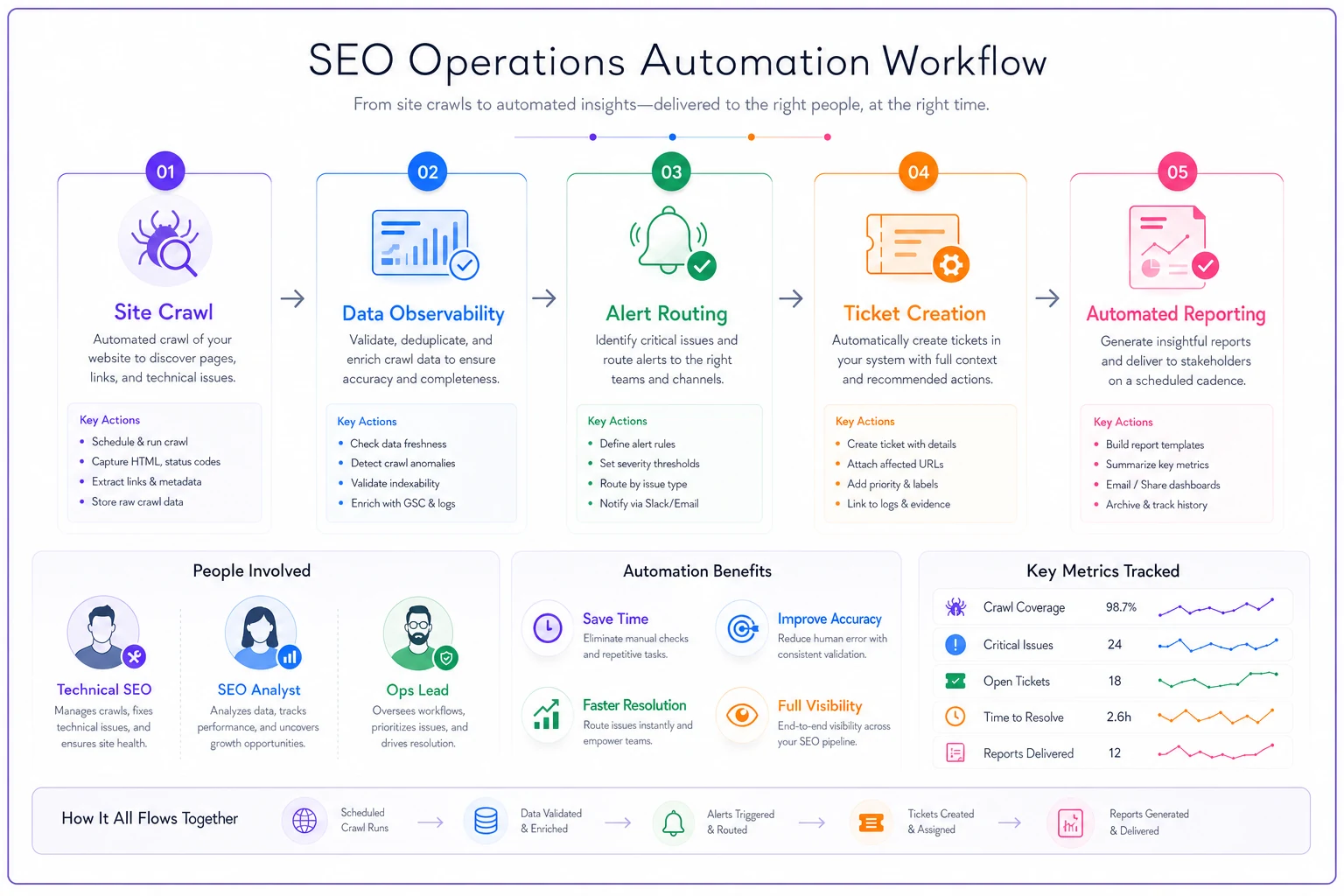
This is also where AI automation earns its place: not in the strategic decisions, but in the judgment‑light, high‑volume glue work. Triaging which crawler issues actually matter by cross‑referencing traffic data, drafting the first version of a remediation ticket, routing the right alert to the right owner, summarizing a week of ranking volatility into something a stakeholder actually reads.
KPIs worth watching
-
Manual hours removed per week
-
Mean time‑to‑detection and time‑to‑ticket for issues
-
Percentage of recurring reports fully automated
-
Tasks auto‑created vs manually logged
-
Coverage
issues caught by automation vs found by accident
Shortlist tests
-
Integration breadth. Does it connect to your actual stack — GSC, GA, your crawler, your ticketing, your warehouse — or just a handful of partner tools?
-
Multi‑user workflow and SLAs. Can multiple people own different automated flows without collisions, and what's the vendor's uptime commitment?
-
ROI traceability. Can you measure hours saved and issues caught, so the automation can defend its own line item?
The job isn't flashy — it's making sure a flagged issue automatically becomes a ticket, a stale feed automatically pages someone, and the monthly report builds itself instead of eating an analyst's Friday.
A real scenario: the overlap cleanup
A mid‑market e‑commerce team — around 18 people split between in‑house and an SEO agency — was running five paid tools totaling roughly $4,500 a month. Two of them crawled the site. Two tracked rankings. The backlink tool overlapped with the agency's own subscription. Nobody could say which crawler's 30,000‑issue report was correct, so technical fixes stalled for most of a quarter.
The cleanup wasn't about buying better tools. They mapped each category to a single owner: one crawler, one rank tracker, one backlink monitor, and a thin observability layer on top of their warehouse. Two redundant subscriptions got cut, saving close to $1,500 a month, and — more importantly — the "whose number is right" argument disappeared because each category had one source of truth. Technical fixes resumed, and within about two months the priority‑page issue count dropped by roughly half, mostly because the team could finally agree on what to fix first.
The lesson wasn't "fewer tools." It was one owner per category, with overlapping features deliberately switched off everywhere else.
How to prioritize when you're hiring‑constrained
If budget and headcount are tight — which, for a lot of teams right now, they are — you don't buy all eight categories at once. You sequence them.
-
Protect what you already rank for. Lock in rank tracking (segmented) and backlink monitoring first. These are your early‑warning systems. Losing visibility you already have is more expensive than not gaining new visibility.
-
Fix what's quietly broken. A technical crawler reconciled with GSC/logs catches the index problems bleeding traffic you can't see.
-
Trust your numbers. A lightweight observability layer prevents you from making every other decision on bad data.
-
Automate the glue. Orchestration multiplies a small team. This is where AI automation pays for itself — not by replacing judgment, but by removing the manual syncing, triage, and reporting that eats a frozen team alive.
-
Then invest in growth tooling. Content research and deeper attribution come once the defensive layers are solid.
This sequence mirrors the logic in our piece on prioritizing and automating SEO work when hiring slows: defend revenue first, remove manual drag second, chase new growth last.
When buying more tooling is a bad idea
This is a short checklist of situations where adding another paid subscription usually makes things worse, not better.
-
When you have no owner for the tool you're about to buy. An unowned tool is shelfware within 60 days.
-
When the new tool overlaps 80% with something you already run. Turn on the feature you already paid for instead.
-
When your data foundation is broken. A fancy attribution model on top of a broken GSC join just produces confident wrong answers faster.
An unowned tool is shelfware within 60 days; overlap and broken foundations amplify the problem.
A shortlist checklist you can actually use
Before signing anything, run every candidate through this:
-
Integration points — does it connect to GSC, GA, your warehouse, your crawler, and your ticketing system natively?
-
Data latency — how fresh is the data, and does "daily" cost extra?
-
Multi‑user / team workflow — can in‑house and agency users work in it without stepping on each other?
-
SLAs — what's the uptime and support commitment, in writing?
-
APIs and export — can you pull your data out, with history, at a reasonable rate limit?
-
ROI tracking — can the tool demonstrate hours saved or revenue influenced, so it survives the next budget review?
-
Category clarity — which single job does this own in your stack, and what overlapping features will you turn off elsewhere?
Run candidate vendors through this checklist during demos and ask for proof (screenshots, export samples, API docs) rather than relying on verbal claims.
References worth checking before you buy
To keep your shortlist grounded in current guidance rather than vendor marketing, pull from primary and reputable secondary sources:
-
Google Search Central documentation — crawling, indexing, canonicalization, and the current stance on structured data and spam policies. This is the ground truth any crawler or governance tool should align with.
-
Search Engine Land and Search Engine Journal — for ongoing coverage of algorithm updates and tooling shifts; useful for sanity‑checking vendor claims about "update‑proof" tracking.
-
Moz — for evergreen explainers on link metrics and domain authority concepts, so you understand what backlink tools are actually estimating.
-
Analyst reports (Gartner, Forrester) on marketing and SEO platforms — for category definitions and buyer‑criteria frameworks, especially around integration and observability.
Read these against your own data, not as gospel. The gap between what a doc says and what your logs show is usually where the real work is.
Mapping SEO software categories isn't about collecting more tools — it's about assigning each job to one owner and one source of truth, then sequencing your buying around what protects revenue first. Most mid‑market teams already own most of what they need. They just bought it in overlapping pieces that nobody coordinates. Sort the stack by category, kill the redundancy, automate the glue work, and let the shortlist checklist keep you honest the next time a vendor demo makes everything look essential.
Ready to elevate your search rankings?
Join 5,000+ businesses using GoSeofy to increase organic traffic, optimize content, and outperform competitors online.