



Every large e-commerce site wastes crawl budget. The question isn't if you're wasting it, but where and how much it's costing you in lost organic revenue.
Most SEO teams know crawl budget exists. They get that Google allocates limited resources per domain. But when you're running a site with 500,000+ URLs, reality hits hard. You've got Googlebot burning through thousands of requests daily on faceted navigation variations, out-of-stock product pages from three years ago, and parameter combinations that shouldn't even exist.
The real challenge? You can't just "noindex everything." Each crawl budget decision impacts revenue differently. A filtered category page might drive zero conversions itself but feeds critical signals to your main category rankings. Meanwhile, that legacy product variant page eating 2,000 crawls monthly hasn't had inventory since 2021.
Why crawl budget becomes an operational nightmare at scale
Crawl budget issues compound exponentially with catalog size. A clothing retailer with 50,000 products doesn't just have 50,000 URLs. They've got:
-
Product pages (50,000)
-
Color variants (×4 average = 200,000)
-
Size combinations (×6 average = 300,000 more)
-
Category filters (?color=, ?size=, ?price= combinations = 2+ million)
-
Search result pages (infinite potential)
-
Legacy URLs from old product lines
-
Session IDs accidentally exposed
-
Print versions, mobile variants
Before you know it, you're sitting on 3 million+ crawlable URLs for a 50,000 product catalog.
Google allocates crawl budget based on domain authority and server health, not your actual catalog size. Amazon gets millions of daily crawls, but your mid-market electronics site might get 50,000. When Googlebot wastes 40,000 of those on parameter hell, your actual products suffer.
The downstream effects cascade through operations. New products take weeks to get indexed. Seasonal category updates don't reflect in search results. Your holiday landing pages from the big campaign? Still showing "Coming Soon" in Google three weeks after launch because Googlebot hasn't gotten around to recrawling them.
Log file analysis: finding where crawl budget actually goes
Server logs tell the truth about crawl patterns. Unlike Search Console (which samples data), your actual server logs show every single Googlebot request. This raw data reveals the operational waste hiding in plain sight.
Stop losing visibility in search results.
GoSeofy helps you monitor, analyze, and improve your SEO performance with ease.
- Comprehensive keyword tracking
- Backlink quality monitoring
- Real-time SEO performance reports
No credit card required
[WORKFLOW-GRAPH-PLACEHOLDER: Crawl Budget Analysis Process - Log Analysis → Pattern Identification → Impact Assessment → Prioritization → Implementation]
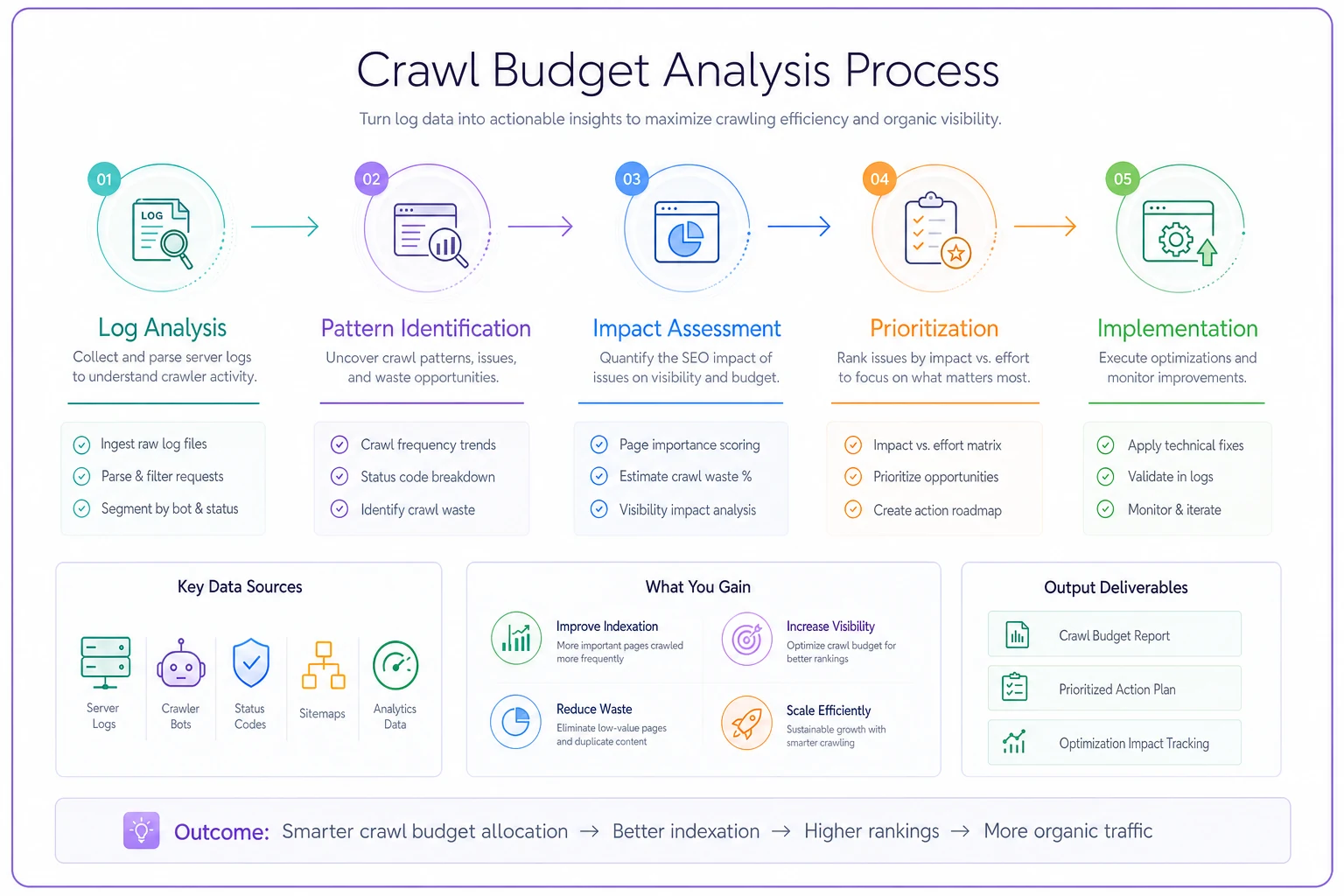
The workflow below outlines the steps.
Here's a basic Apache log query to pull Googlebot activity:
grep "Googlebot" /var/log/apache2/access.log | awk '{print $7}' | sort | uniq -c | sort -rn | head -50
This shows your top 50 most-crawled URLs by frequency. The results usually shock operations teams.
For deeper analysis, you need structured queries. Using a tool like GoAccess or parsing logs into a database gives you real operational visibility:
SELECT urlpath, COUNT(*) as crawlcount, COUNT(DISTINCT DATE(timestamp)) as dayscrawled, MAX(timestamp) as lastcrawl FROM googlebotlogs WHERE timestamp > DATESUB(NOW(), INTERVAL 30 DAY) GROUP BY urlpath HAVING crawlcount > 100 ORDER BY crawl_count DESC LIMIT 100;
This query surfaces URLs getting hammered repeatedly. The patterns become obvious fast. Common waste patterns in log files include parameter explosion where URLs like /products?sort=price&color=red&size=M&brand=nike&instock=true get thousands of crawls when the canonical /products page would suffice.
Session ID leakage creates another problem - ancient URLs with session parameters like /cart?sid=abc123def456 still get crawled years later. Pagination gone wild means category pages going 500+ pages deep when products past page 10 generate zero organic traffic. Search result indexation creates infinite crawlable combinations through internal search URLs like /search?q=blue+shoes.
The conversion-impact prioritization model
Not all crawl budget waste hurts equally. Fixing the wrong issues first wastes engineering resources without moving revenue metrics.
You need three data points:
-
Current crawl volume (from logs)
-
Organic traffic potential (from Search Console + Analytics)
-
Conversion impact (from your ecommerce platform)
Build a scoring matrix:
| URL Pattern | Monthly Crawls | Organic Sessions | Conversion Rate | Revenue Impact | Fix Priority |
|---|---|---|---|---|---|
| /filter variations | 45,000 | 200 | 0.1% | $500 | Critical |
| /out-of-stock/old | 12,000 | 0 | 0% | $0 | High |
| /search?q=* | 8,000 | 1,500 | 0.3% | $2,000 | Medium |
| /page/[50+] | 6,000 | 50 | 0% | $100 | High |
| Session URLs | 3,000 | 0 | 0% | $0 | Medium |
The scoring formula: Waste Score = (Crawls × 0.5) - (Revenue × 10) - (Organic Sessions × 0.1)
Higher waste scores indicate bigger problems. This model identifies high-crawl, low-value URLs systematically.
A furniture retailer discovered 60% of crawl budget went to filtered combinations of discontinued product lines. These pages had zero inventory, zero traffic, but still got 30,000 crawls monthly. The fix freed up crawl budget for their new spring catalog, improving indexation speed by about 3 weeks.
Remediation patterns that actually work
Pattern 1: Dynamic robots.txt for parameter control
Block worthless parameter combinations User-agent: Disallow: /?sort= Disallow: /?filter= Disallow: /?session= Disallow: /?sid= # But allow high-value filters Allow: /?brand=nike Allow: /?brand=adidas Allow: /?category=shoes
This requires operational maintenance. Your robots.txt needs updates when you add major brands or categories. Build this into your release process.
Pattern 2: Canonical implementation for variant control
<!-- On /product/shirt?color=blue&size=L --> <link rel="canonical" href="/product/shirt" /> <!-- But keep canonical self-referencing for high-value variants --> <!-- On /product/limited-edition-shirt-blue --> <link rel="canonical" href="/product/limited-edition-shirt-blue" />
The operational distinction matters. Generic variants should canonical to the parent. Unique SKUs with distinct search intent keep self-referencing canonicals.
Pattern 3: Progressive noindex for deep pagination
def getpaginationdirective(pagenumber, totalresults): resultsperpage = 24 totalpages = totalresults / resultsperpage if pagenumber == 1: return "index, follow" elif pagenumber <= 3: return "index, follow" elif pagenumber <= 10 and totalresults > 500: return "index, follow" else: return "noindex, follow"
This keeps valuable early pages indexed while preventing crawl waste on page 47 of your "blue widgets" category.
Pattern 4: XML sitemap prioritization
<url> <loc>https://store.com/categories/best-sellers</loc> <priority>1.0</priority> <changefreq>daily</changefreq> </url> <url> <loc>https://store.com/product/standard-widget</loc> <priority>0.7</priority> <changefreq>weekly</changefreq> </url>
Don't include in sitemap:
-
Filtered variations
-
Search results
-
Paginated pages beyond page 3
-
Out of stock items (unless temporarily)
Your sitemap shouldn't list every URL. Use priority scores based on business value.
Real scenario: fashion retailer's crawl budget recovery
A mid-size fashion retailer with ~80,000 products was struggling with indexation. New seasonal collections took 4-6 weeks to appear in Google. Their technical team blamed "Google being slow."
Log analysis revealed the actual problem:
-
250,000 daily Googlebot requests
-
180,000 wasted on parameter combinations
-
40,000 on discontinued products
-
Only 30,000 reaching actual sellable products
Their URL structure created combinations like:
/womens/dresses?color=red&size=8&length=midi&sleeve=long&material=cotton&price=50-100&sort=newest&page=12
Each filter combination generated a unique URL. With 15 dress colors, 8 sizes, 5 lengths, 4 sleeve types, 6 materials, and 5 price ranges, they had potentially 36,000 URLs per category. Multiply by 50 categories.
The fix process looked like this:
-
Immediate
Robots.txt blocked sort and multi-parameter combinations
-
Week 1
Implemented canonicals pointing filtered pages to main category
-
Week 2
Added noindex to pagination past page 5
-
Week 3
Removed 22,000 discontinued products from sitemap
-
Month 2
Built parameter handling into their ecommerce platform
Results after 60 days showed dramatic improvement. Crawl efficiency jumped to 70% (from 12%). New products indexed in 5-7 days (from 4-6 weeks). Organic traffic to new collections increased ~40%. Seasonal landing pages stayed fresh in SERPs.
The revenue impact was harder to isolate but their organic conversion rate improved from 2.1% to 2.7% as Google served fresher content.
When to actually preserve crawl budget (and when not to care)
Not every site needs aggressive crawl budget management. If you're running 10,000 URLs on decent hosting, Google probably crawls everything fine. The operational overhead of complex robots rules might exceed the benefit.
Crawl budget triage makes sense when you have 100,000+ URLs, new content takes weeks to get indexed, important pages show stale information in SERPs, log files show Googlebot hitting limits, or you see "Discovered - currently not indexed" at scale.
Skip crawl budget optimization if your site has under 50,000 URLs, everything gets indexed within days, you don't have parameter or filter issues, or your categories stay relatively static.
Building crawl budget management into operations
Crawl budget isn't a one-time fix. It needs operational governance or problems resurface within months.
Create quarterly review cycles:
-
Pull log files for Googlebot activity
-
Compare against previous quarter
-
Identify new waste patterns
-
Check indexation rates for new content
-
Adjust robots.txt and canonical rules
-
Update XML sitemaps
Document decisions in a crawl budget register:
| Date | URL Pattern | Action Taken | Reason | Impact |
|---|---|---|---|---|
| 2024-01 | /filter?size=* | Robots.txt block | 40k crawls, zero conversions | Freed 15% budget |
| 2024-01 | /products/page/[20+] | Noindex | Low traffic after page 20 | Freed 8% budget |
| 2024-02 | Old seasonal pages | 404 -> 410 | Three-year-old Christmas pages | Freed 5% budget |
This documentation helps when someone asks "why can't Google see our filtered pages?" six months later.
Modern ecommerce platforms generate URLs faster than humans can audit them. AI-powered operational software helps with crawl budget management by flagging crawl waste patterns as they emerge, suggesting remediation based on conversion data, and auto-generating robots.txt rules for review.
The automation doesn't replace human judgment on business-critical decisions like which categories to prioritize. But it handles parsing millions of log entries, identifying parameter patterns, and tracking indexation rates across your catalog.
The 90-day crawl budget recovery timeline
Month 1: Stop the bleeding
-
Block obvious waste via robots.txt
-
Remove defunct URLs from sitemaps
-
Fix parameter handling on new URLs
Month 2: Consolidate signals
-
Implement canonical strategy
-
Add noindex to low-value pages
-
Clean up redirect chains
Month 3: Optimize for conversion
-
Prioritize XML sitemaps by revenue
-
Adjust crawl directives based on data
-
Build monitoring into weekly ops
The timeline assumes you've got engineering resources available. Without developer support, focus on what you can control: robots.txt and XML sitemaps. Those changes alone can recover 20-30% of wasted crawl budget.
Avoiding the overcorrection trap
Some operations teams get aggressive with crawl budget and accidentally deindex revenue-driving pages. Common mistakes include over-blocking in robots.txt where blocking /products/? seems logical until you realize your color variants like /products/shirt?color=bestselling-blue drive significant organic traffic.
Noindexing too early in pagination hurts since page 2 and 3 of categories often drive meaningful traffic. Run the data before noindexing. Canonical confusion happens when setting all filtered pages to canonical back to /products can hurt if specific filters rank for valuable queries.
Sitemap minimalism might make sense for crawl budget, but some variants deserve their own indexation.
Always check organic traffic data before implementing blocks. What looks like waste in logs might be driving conversions you didn't know about.
Crawl budget triage as competitive advantage
While competitors waste Googlebot's time on infinite URL variations, smart crawl budget management gets your new products and seasonal campaigns indexed faster. In competitive verticals where timing matters - fashion, electronics, seasonal goods - this speed difference translates directly to revenue.
The operational discipline required for crawl budget management forces better URL governance overall. Teams that actively manage crawl budget tend to have cleaner site architecture, better parameter handling, and more thoughtful information hierarchy. These improvements benefit user experience beyond just SEO.
Start with log file analysis. See where Googlebot actually spends time on your site. The patterns will surprise you, and the fixes are usually more straightforward than expected. Build the remediation into your operational workflow, track the impact on indexation speed, and watch your organic performance improve as Google discovers your actual valuable content instead of drowning in parameter soup.
The key isn't perfection. It's systematic improvement. Recover 10% of wasted crawl budget each quarter and within a year you've transformed your site's indexation efficiency. For large ecommerce operations, that efficiency gain directly impacts how fast new inventory reaches organic search - and ultimately, your customers.
Ready to elevate your search rankings?
Join 5,000+ businesses using GoSeofy to increase organic traffic, optimize content, and outperform competitors online.