

Three months ago, I was digging through server logs for an online furniture retailer doing about $2.4M annually. Their category pages drove 62% of organic revenue, but Search Console showed everything was fine—decent impressions, steady clicks. The log files told a completely different story. Googlebot was hitting their homepage 847 times daily while their highest-revenue category page ("/living-room/sofas/") got crawled twice a week. Meanwhile, their abandoned cart recovery pages—zero revenue value—were getting crawled 200+ times daily because of some weird URL parameter issue.
This disconnect between crawl budget and business value happens all the time. Search Console won't show you these patterns. GSC only reports on pages that actually get impressions. If Google isn't indexing your money pages properly, they won't even appear in your GSC data. You're basically flying blind.
The expensive gap between what matters and what gets crawled
Most businesses discover indexation problems backwards—revenue drops, panic sets in, then investigation begins. By that point, you've already lost weeks or months of potential traffic.
I see this pattern constantly: businesses launch new product lines or seasonal collections, wait for organic traffic, then wonder why nothing happens. They check Search Console, see no errors, assume everything's fine. Six weeks later they dig deeper and find Googlebot never even attempted to crawl those pages. Or worse—crawled once, got a 500 error during high server load, and didn't come back.
The damage compounds quickly. A home services company I analyzed had service area pages generating $18k monthly through organic traffic. Due to a site migration issue, those pages started returning soft 404s intermittently. Googlebot gradually stopped crawling them. Revenue from those pages dropped 73% over eight weeks before anyone noticed.
Traditional SEO monitoring catches these issues too late because it relies on outcomes (rankings, traffic) rather than inputs (crawl behavior). By the time rankings drop, the indexation damage is already done.
Reading log files without drowning in data
Raw server logs contain everything—every bot hit, every user request, every API call. A medium-sized ecommerce site generates 2-3GB of log data daily. Without proper filtering, you're staring at millions of irrelevant lines.
Stop losing visibility in search results.
GoSeofy helps you monitor, analyze, and improve your SEO performance with ease.
- Comprehensive keyword tracking
- Backlink quality monitoring
- Real-time SEO performance reports
No credit card required
Start with this basic extraction approach:
-
Filter for Googlebot specifically ``
grep "Googlebot" access.log > googlebot_only.log`` This immediately cuts your data by 90%+. Focus only on legitimate Googlebot user agents. -
Extract business-critical URLs Create a list of your revenue-driving pages first. For most businesses, this includes: - Product category pages - High-margin product pages - Service pages in profitable locations - Landing pages from paid campaigns you want to transition to organic
-
Match crawl frequency to page value ``
awk '{print $7}' googlebotonly.log | sort | uniq -c | sort -rn > crawlfrequency.txt`` This shows you which URLs get crawled most. Compare against your revenue data.
Start filtering by Googlebot and immediately match the results to your top revenue pages to avoid wasted effort.
The shocking part is usually what's missing. Pages you assumed were regularly crawled might appear zero times in a 30-day log sample.
Visualization patterns that expose blind spots immediately
Numbers in text files don't tell stories. You need visual patterns to spot problems fast.
Crawl depth heatmap
Plot your site architecture with crawl frequency as color intensity. Your money pages should glow hot. If they're cold while random blog posts from 2019 are burning bright, you've found your problem.
Create a simple CSV with three columns:
-
URL path
-
Click depth from homepage
-
30-day crawl count
Plot this as a scatter plot with depth on X-axis, crawl count on Y-axis. Your valuable pages should cluster in the bottom-left (shallow + frequently crawled).
Time-based crawl distribution
``
grep "category-page" googlebot_only.log | awk '{print $4}' | cut -d: -f1-2 | sort | uniq -c
``
This reveals crawl patterns. One retailer discovered Googlebot hammered their site 3-4 AM when their CDN was slowest, causing timeout errors on product pages. They only caught this through timestamp analysis.
Response code patterns
``
awk '{print $9, $7}' googlebot_only.log | sort | uniq -c | sort -rn | head -20
``
Look for any 4xx or 5xx errors on revenue pages. A few 404s on old blog posts? Fine. But a single 500 error on your main category page means Google might skip it for weeks.
Priority matrix: fixing what costs you money first
Not all indexation issues matter equally. Fix problems in this order:
Priority 1: Revenue pages returning errors
-
Pages currently generating revenue showing 4xx/5xx to Googlebot
-
Fix immediately—every crawl failure costs money
-
Usually quick fixes
redirects, server config, timeout settings
Priority 2: Revenue pages not being crawled
-
High-value pages with zero or minimal crawl activity
-
Often caused by
deep site architecture, orphaned pages, canonicalization issues
-
Fix through
internal linking, sitemap optimization, URL structure
Priority 3: Crawl budget waste
-
Low-value pages consuming excessive crawl budget
-
Includes
filtered URLs, session IDs, infinite scroll parameters
-
Fix through
robots.txt, parameter handling, canonical tags
Priority 4: Seasonal or promotional pages
-
Time-sensitive pages that need immediate indexation
-
Fix through
temporary homepage links, fetch and render requests
Here's how this looked for a B2B software company:
| Issue Found | Monthly Traffic Loss | Fix Effort | Implementation |
|---|---|---|---|
| Service pages timing out | ~$24k | 2 hours | CDN configuration |
| New features not indexed | ~$8k potential | 1 day | Sitemap + linking |
| Blog pagination crawled 500x daily | $0 (but blocking other crawls) | 30 minutes | Robots.txt |
| Geographic landing pages orphaned | ~$12k | 3 hours | Navigation update |
They fixed issues worth $44k in monthly revenue impact with about two days of work, guided entirely by log file analysis.
Common blind spots that kill organic revenue
The redirect chain disaster
Your highest-value category page redirects to a new URL. That redirects to another URL for mobile. That conditionally redirects based on geographic location. Googlebot follows two redirects then gives up. Your page effectively doesn't exist.
The parameter explosion
Filtering and sorting create infinite URL combinations. Your 50 actual products become 5,000 URLs to Google. Crawl budget depletes on variations of the same content while new products wait weeks for discovery.
The accidental noindex
A developer adds noindex during testing. Forgets to remove it. The page serves users fine, generates revenue through direct traffic and email, but never appears in search. Without log analysis showing Googlebot visiting but not indexing, you'd never know.
The CDN timeout gap
Your CDN serves pages instantly to users but has different timeout rules for bots. Googlebot requests a page, CDN takes 6 seconds to fetch from origin during cache miss, Googlebot times out at 5 seconds. Page works perfectly for humans, invisible to search.
Building a monitoring system that catches issues early
Manual log analysis works for investigations but not prevention. You need automated tracking to catch problems before they impact revenue.
Set up these monitors:
-
Daily crawl tracking - Count Googlebot hits on your top 100 revenue pages - Alert if any drops below threshold (usually 1 crawl per week minimum) - Track response codes for each crawl
-
Weekly pattern analysis - Compare crawl distribution to revenue distribution - Flag pages with high revenue but low crawl rate - Identify new URLs not crawled within 7 days of creation
-
Monthly deep dive - Full log analysis comparing to previous month - Check for new error patterns - Validate that fixes actually changed crawl behavior
Small businesses often skip log file analysis because it seems technically complex. But the basics—filtering for Googlebot, checking response codes, matching crawl frequency to page value—can be done with basic command line tools or Excel.
Here's a quick visual workflow for an automated monitoring system.
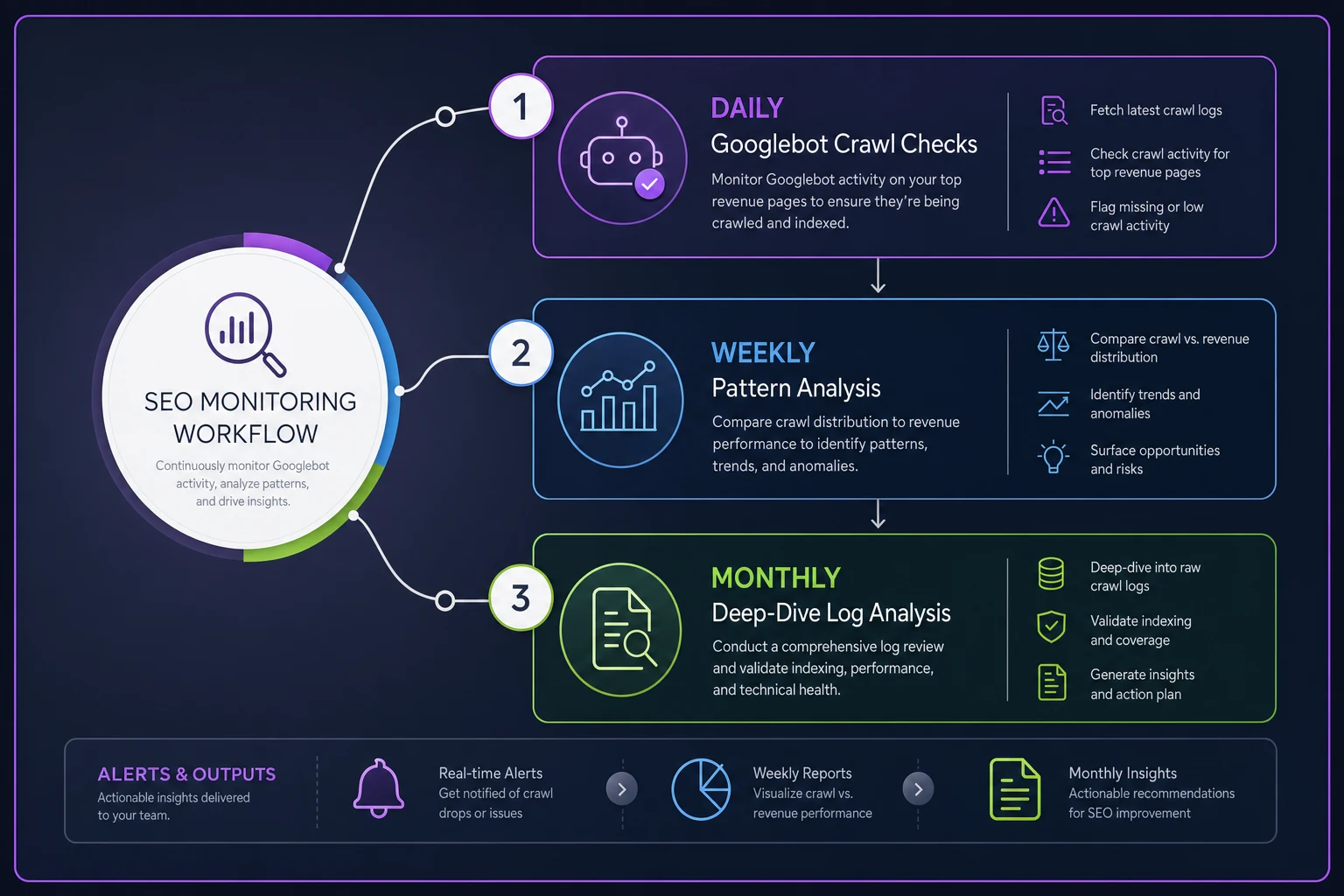
The harder part is maintaining this analysis consistently. Most businesses run one analysis, fix obvious issues, then forget about it until the next crisis. This is where having systematic monitoring becomes critical. Whether you build it yourself or use operational software that automates log analysis, consistency is key.
When log analysis makes sense (and when it's overkill)
You need log file analysis if:
-
You have 1,000+ indexable pages
-
Organic traffic drives 20%+ of revenue
-
You launch new products/services regularly
-
You've had indexation issues before
-
Your site has complex JavaScript rendering
You can skip it if:
-
You have under 100 pages
-
Your site structure is completely flat
-
You rarely add new content
-
Search Console shows healthy coverage
For most growing businesses, the question isn't whether to do log analysis but how often. Monthly is usually sufficient unless you're actively fixing issues or launching major new sections.
The implementation checklist
Start with this basic process:
-
Enable comprehensive logging - Ensure your server logs Googlebot activity - Include timestamp, URL, response code, response time - Store logs for minimum 30 days
-
Create your priority page list - Export top revenue pages from analytics - Include new product/service pages - Add seasonal or promotional pages
-
Run initial analysis - Filter logs for Googlebot only - Match against priority pages - Identify crawl gaps and errors
-
Fix by priority - Start with error-returning revenue pages - Move to uncrawled valuable pages - Then address crawl waste
-
Validate fixes - Check logs 1 week after changes - Confirm Googlebot behavior changed - Monitor Search Console for indexation
-
Automate monitoring - Set up weekly crawl tracking - Alert on anomalies - Schedule monthly reviews
The entire process takes a few hours initially, then becomes a 30-minute weekly check once automated.
Beyond fixing—optimizing crawl for growth
Once you've eliminated blind spots, you can optimize proactively. One marketplace site restructured their category page URLs to be one click from homepage instead of three. Crawl frequency increased 4x. Organic traffic to those pages grew 47% over two months.
Another approach: time your important launches. If you know Googlebot visits daily around 2 AM, schedule new product pages to go live at 1:45 AM. Sounds minor, but it can cut indexation time from days to hours for time-sensitive content.
The real value of log file analysis isn't just fixing problems—it's understanding how Google actually interacts with your site versus how you think it does. That knowledge becomes competitive advantage. While competitors wait weeks for new pages to get indexed, you know exactly how to get Googlebot's attention within hours.
Most businesses never look at their log files. They trust Search Console, check rankings, hope for the best. But Search Console only shows you pages that are already indexed and getting impressions. The pages that could drive revenue but aren't even in Google's index? Those remain invisible until you dig into the logs.
Your next step is clear: pull your last 30 days of logs, filter for Googlebot, and check if your highest-value pages are actually getting crawled. What you find might explain a lot about your organic traffic patterns. More importantly, what you don't find might reveal the revenue you're leaving on the table.
Ready to elevate your search rankings?
Join 5,000+ businesses using GoSeofy to increase organic traffic, optimize content, and outperform competitors online.