


Most SEO alerting setups fail in one of two ways. Either they're so sensitive that your Slack channel fills with "clicks dropped 18% on /blog/hiring-tips" at 6am every Monday (because weekends are always slow), or they're so loose that a category tree quietly loses 40% of its impressions over nine days and nobody notices until revenue reporting catches it three weeks later.
The hard part isn't building the alert. Anybody can threshold a metric. The hard part is writing rules that fire when something actually broke, routing them to the right person, and giving that person enough context to act in the first ten minutes — instead of spending an hour figuring out whether the alert is even real.
This covers the mechanics of that: concrete detection rules (both statistical and business-logic based), the sampling and latency trade-offs you're making whether you realize it or not, how to route alerts so the right human sees them, and the triage runbooks that turn a 2am page into a 15-minute fix.
Why most anomaly alerts are either too loud or too quiet
The core problem is that SEO metrics are noisy in predictable and unpredictable ways at the same time.
Predictable noise: weekly seasonality (B2B traffic craters on weekends), monthly patterns, and the normal jitter of Search Console data that gets revised for 2–3 days after the fact. If your rule compares today vs. yesterday on raw clicks, you'll alert on noise constantly.
Unpredictable noise: Google data delays, sampling in GA4, a single high-volume page getting temporarily deindexed and recovering on its own, or a reporting pipeline that silently dropped a day of data. These look exactly like real problems for the first few hours.
What tends to happen is that teams respond to false positives by raising thresholds. A rule that fired too often at "−15%" gets bumped to "−30%." Now it's quiet — and it also misses the slow bleeds, which are the ones that actually cost money. A page set losing 4% a day for ten days never trips a −30% daily threshold but ends up down roughly 34%.
The fix isn't a magic threshold. It's layering different detection methods so each one covers the others' blind spots.
The two families of detection rules you actually need
Statistical rules (catch the unexpected)
Stop losing visibility in search results.
GoSeofy helps you monitor, analyze, and improve your SEO performance with ease.
- Comprehensive keyword tracking
- Backlink quality monitoring
- Real-time SEO performance reports
No credit card required
These compare current behavior against expected behavior based on history. They're good at catching things you didn't anticipate.
-
Week-over-week, same-day comparison. Compare Tuesday to the trailing 4 Tuesdays, not to Monday. Kills most seasonality false positives on its own.
-
Rolling z-score / median absolute deviation (MAD). For a given page group, take the trailing 28 days, compute the median and MAD, and flag when today's value sits more than ~3.5 MADs below the median. MAD is more robust than standard deviation because one weird spike day doesn't blow up your baseline.
-
STL decomposition for the important segments. For your top 10–20 revenue page groups, decompose the series into trend + seasonal + residual, and alert on the residual. This catches a genuine trend break that a simple threshold hides inside normal weekly swings.
Business-logic rules (catch the known failure modes)
These don't care about statistics. They encode "this specific thing should never happen."
-
Indexable URL count for a template drops below a floor (e.g., product template falls under 90% of its 7-day average indexed count).
-
A page that was returning 200 now returns 5xx/4xx and had >X clicks in the last 30 days.
-
noindexappears on any URL in a protected path (/category/,/product/). -
Canonical tag points off-domain or to a different template.
-
Structured-data validity drops below a threshold for a monitored type.
Business rules are where the fast, confident alerts come from. When a canonical flips on 2,000 product pages, you don't need 28 days of history to know that's bad.
Here's a rough comparison of when each type earns its keep:
| Detection type | Best at catching | Latency | False-positive risk | Baseline needed |
|---|---|---|---|---|
| Same-day WoW threshold | Sudden click/impression drops | Low (hours) | Medium | 4 weeks |
| Rolling MAD / z-score | Unexpected deviations in any segment | Low–medium | Medium | 28 days |
| STL residual | Slow trend breaks hidden by seasonality | Medium (1–2 days) | Low | 60–90 days |
| Business-logic rule | Known catastrophic failures | Very low (minutes) | Very low | None |
The pattern worth internalizing: business-logic rules for things you can define as "never allowed," statistical rules for everything else.
The sampling and latency trade-off nobody talks about
Every alert you write sits on a slider between "fast but wrong sometimes" and "accurate but late." You're choosing a position on that slider whether or not you do it consciously.
Search Console data is delayed and gets revised for roughly 2–3 days. If you alert on the most recent day of GSC clicks, you're alerting on partial, unstable data. A page can look down 25% at the T+0 pull and be down only 6% once the data settles.
GA4 introduces sampling once you cross thresholds on large date ranges or high-cardinality queries. An alert that queries sampled data can swing enough to cross a threshold on sampling variance alone.
Server logs / crawl data are near-real-time but noisy and don't tell you about rankings or clicks directly.
The practical approach is to tier alerts by how much latency you can tolerate:
-
Minutes (logs, status codes, response headers) business-logic rules only. High confidence, fast action. 5xx spike, noindex injection, robots.txt change.
-
Hours (same-day GSC, treated as provisional) fire a soft alert — "possible drop, data not settled" — that triages but doesn't page anyone at night.
-
1–3 days (settled GSC, STL residuals) fire hard alerts that confirm or dismiss the earlier soft alerts.
One technique that cuts a lot of false positives: make soft alerts auto-resolve. If the T+0 alert fired on "−22% clicks" and the T+2 settled data shows "−7%," the system closes the ticket itself and nobody wastes time on it. You only escalate alerts that survive data settling.
Quick visual of the alerting tiers:
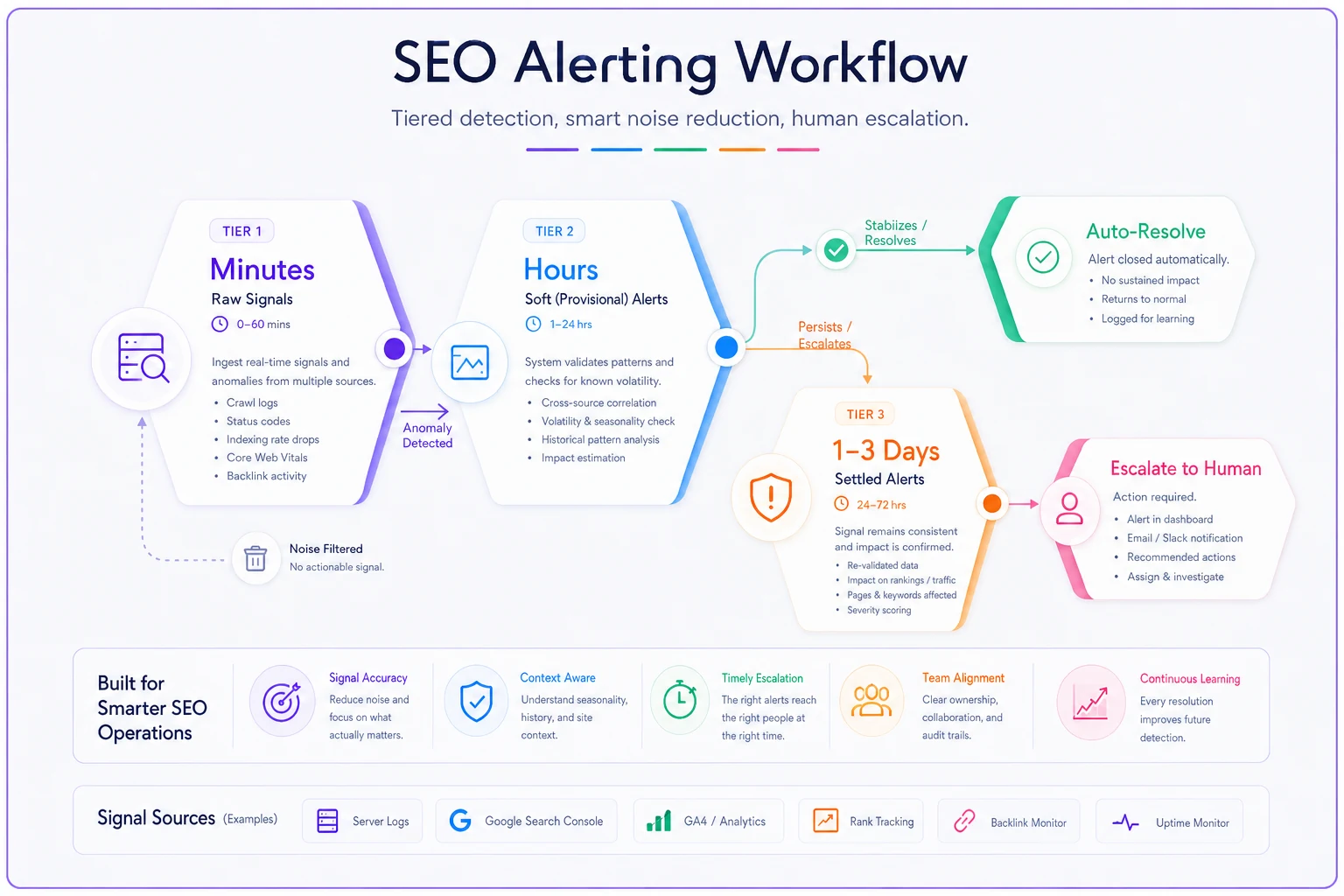
This shows the tiered workflow and where auto-resolve and escalation fit in.
Alert routing: get the right alert to the right human
A correct alert sent to the wrong person is a false negative in disguise. It'll just sit there.
Routing should be driven by two things: what kind of failure it is and how much revenue is attached. A drop on a page group that drives real revenue is a different urgency than the same percentage drop on a help-center article. This is exactly where a business-aligned SEO measurement framework pays off — if you've already mapped which page groups tie to revenue, routing becomes trivial. The alert payload can carry a conversion-impact estimate and route itself.
A routing model that works:
-
5xx / deindex / robots on protected paths → on-call engineer, immediate page. These are almost always deploy-related and need an eng response, not an SEO analyst.
-
Ranking / click drops on revenue pages → SEO lead, business-hours urgent.
-
Click drops on low-value pages → queue, reviewed in weekly triage.
-
Structured-data / canonical anomalies → SEO + eng shared channel, same-day.
Two routing mistakes show up repeatedly. First, everything goes to one channel, so the catastrophic and the trivial look identical and people start ignoring the channel entirely. Second, the alert payload is just a number with no link, no affected URL list, and no "what changed recently" context — so the responder spends the first 20 minutes doing archaeology.
A good payload includes: the metric and magnitude, the affected URL group (with a sample of specific URLs), the recent deploy/release window, a link straight to the relevant dashboard, and a one-line probable cause based on the rule type.
Triage runbooks: what the first responder actually does
The person who catches the alert shouldn't have to improvise. Each alert class should map to a short runbook. Here's one for the most common and most expensive case.
Runbook: sudden click/impression drop on a revenue page group
-
Confirm it's real (first 5 min). Check whether this is a soft (T+0) or settled alert. If soft, note it and wait for settling — unless it's paired with a business-logic alert, in which case treat it as real immediately.
-
Check for a deploy. Look at the release window in the payload. A large share of real, sudden drops line up with a recent deploy or config change. If there's a deploy in the window, that's your prime suspect.
-
Fetch and render a sample URL. Pull 3–5 affected URLs. Check status code, canonical, robots meta, and whether content renders. This catches noindex injection, broken rendering, and template breaks fast.
-
Separate "lost impressions" from "lost CTR." Impressions flat but clicks down → likely a SERP feature change or title/meta change, not an indexing problem. Impressions down → ranking or indexing issue.
-
Decide
rollback or investigate.
If a deploy caused it and it's revenue-critical, trigger rollback per your gates rather than debugging live. The same rollback discipline covered in the technical SEO migration playbook applies to any release that touches indexable surfaces. -
Log the cause and update the rule. If it was a false positive, note why, so you can tune the rule instead of just raising the threshold.
That last step is the one teams consistently skip, and it's why their alerting never gets quieter.
Techniques to actually reduce false positives
Raising thresholds is the lazy fix.
These are the ones that work:
-
Require two independent signals for high-severity alerts. A click drop and a ranking drop and/or a crawl anomaly. Single-signal statistical drops become soft alerts; multi-signal become hard alerts. This alone removes a large share of noise.
-
Minimum-volume floors. Don't run percentage alerts on pages with tiny traffic. A page going from 8 to 4 clicks is −50% and completely meaningless. Set a floor (e.g., only alert on groups with 100+ clicks/week).
-
Suppress during known events. Core updates, planned migrations, and big promos should put affected segments into a maintenance window so you're not fielding 40 alerts during an expected shake-up.
-
Baseline per segment, not globally. Blog, product, and category pages have completely different volatility. A threshold that's right for category pages will spam you on blog pages.
-
Auto-resolve on data settling, as described above.
-
Track false-positive rate as a metric. If a rule's false-positive rate climbs above roughly 30%, it's actively training people to ignore alerts. Tune or kill it.
Require two independent signals before paging humans for high-severity alerts.
If a rule's false-positive rate climbs above roughly 30%, it's actively training people to ignore alerts. Tune or kill it.
A real scenario
A mid-size e-commerce site (home goods, roughly $9M in annual online revenue) had a Search Console alert firing on daily click drops. It was tuned to −20% day-over-day. During a normal month it fired somewhere around 25–30 times, and almost all of them were weekend seasonality or unsettled data. The team had quietly muted the channel.
Then a release added a tracking parameter that caused canonical tags on about 1,400 product pages to self-reference the parameterized URL. Impressions started sliding. Because the only alert was the noisy day-over-day one — and because nobody was watching it anymore — the decay ran for about eleven days before someone noticed revenue softening in the weekly report. The lost organic revenue during that window was somewhere in the $14k–$19k range, plus recovery time.
The rebuild was straightforward: they moved to same-day WoW comparisons with a 28-day MAD baseline for statistical drops, added a hard business-logic rule on canonical integrity for protected paths, and required two signals for anything that paged a human. Alert volume dropped to roughly 4–6 per week, and the ones that fired were real. When a similar canonical issue showed up again months later, the business-logic rule caught it within the same deploy window — before any meaningful traffic was lost.
When heavy anomaly detection isn't worth it
Not every site needs STL decomposition and multi-signal routing.
When it makes sense: you've got meaningful organic revenue, frequent deploys that touch indexable pages, and enough page volume that manual checking can't keep up. If a day of a broken template costs you four figures, the investment is obvious.
When it's overkill: a small site with a handful of pages and infrequent changes. A weekly manual look at Search Console and a couple of simple business-logic checks (is anything returning 5xx, did a noindex sneak in) will serve you better than a detection stack you won't maintain.
Who should not do this: teams that won't commit to the tuning loop. An anomaly detection system you set up and never revisit degrades into noise within a quarter, and noise is worse than nothing because it teaches your team that alerts don't matter.
The thing that actually determines whether this works
The detection rules are the easy part. The discipline — auto-resolving soft alerts, requiring multiple signals, logging every false positive and tuning the rule instead of raising the threshold, keeping runbooks current — is what actually decides whether your alerting catches the eleven-day canonical bleed or buries it under weekend seasonality noise.
Start with the business-logic rules, because they're fast, confident, and cheap to maintain. Layer statistical detection on top for your highest-revenue segments only. Route by revenue and failure type, not by percentage drop. And treat every false positive as a bug in the rule, not an acceptable cost of monitoring. Do that, and the channel stays quiet enough that people actually look when it finally lights up.
Do that, and the channel stays quiet enough that people actually look when it finally lights up.
Ready to elevate your search rankings?
Join 5,000+ businesses using GoSeofy to increase organic traffic, optimize content, and outperform competitors online.