
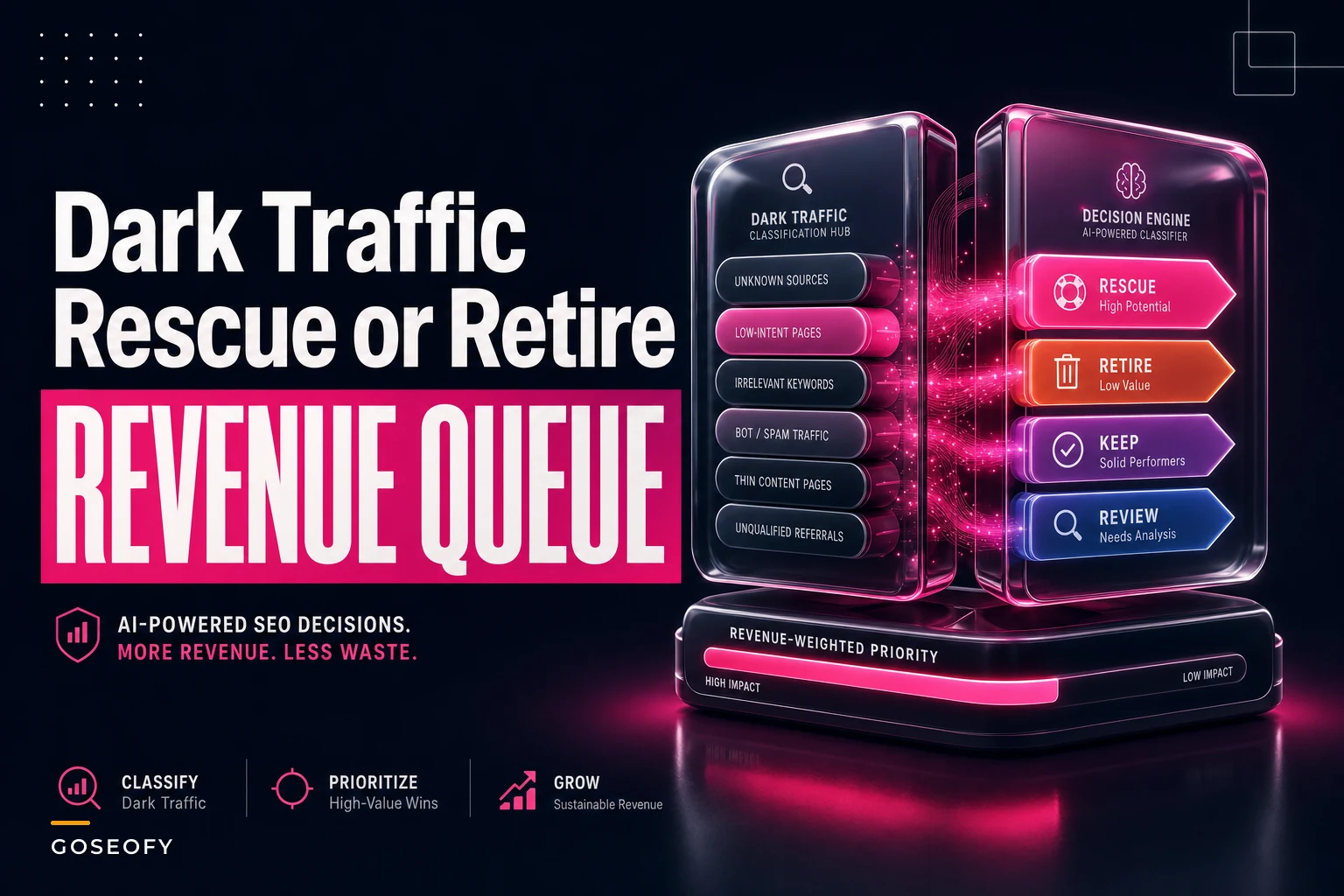

There's a specific kind of page that quietly piles up on almost every site I've looked at: it collects impressions in Google Search Console, maybe even a handful of clicks, and then nothing. No conversions. No assisted revenue. No signups. Just impressions floating in the dark, consuming crawl attention and diluting your topical signals without ever paying rent.
That's what I call indexing dark traffic — pages Google sees and surfaces, but that your business never actually benefits from. The hard part isn't finding pages with zero conversions. That's easy. The hard part is deciding which of those pages are secretly close to working (rescue) versus which ones should be consolidated, redirected, or killed (retire).
Get that classification wrong and you either delete a page that was two tweaks away from ranking, or you spend three weeks "optimizing" something that was never going to convert because the intent behind the query doesn't match anything you sell.
This post is about doing that classification properly — combining GSC impression data with engagement and conversion signals, running it through SQL you can actually copy, and ending with a prioritized action queue sorted by revenue impact instead of gut feeling.
Why impressions-without-conversions pages are so easy to misread
The mistake almost everyone makes is treating "no conversions" as a single category. It isn't. A page with 4,000 monthly impressions and zero conversions can mean five completely different things:
-
It ranks on position 18 for a high-intent query, so nobody clicks (rescue — it's close)
-
It ranks well but for a query with no commercial intent (retire or repurpose)
-
It gets clicks but users bounce instantly because the page doesn't match the snippet (rescue — content/intent mismatch)
-
It's a thin variant of a stronger page cannibalizing your own rankings (retire/consolidate)
-
It's a legacy page nobody maintains that Google keeps surfacing out of habit (retire)
The impression count alone can't tell these apart. You need to layer three signal groups on top:
-
Visibility signals — impressions, average position, query count, CTR (from GSC)
-
Engagement signals — clicks, sessions, bounce/engagement rate, scroll depth or time on page (from GA4 or your analytics warehouse)
-
Conversion signals — direct conversions and assisted/last-non-direct conversions, plus revenue if you have it
Teams join GSC and GA at the page level, see "0 conversions," and immediately send the page to the pruning pile. Then organic revenue dips in a category three weeks later because one of those "dead" pages was actually an assist in a longer buying path. If your joins aren't trustworthy to begin with, this gets worse fast — which is why getting your GSC/GA data lineage and ownership right matters before you make kill decisions.
The classification logic, before any SQL
The point of this framework is to make "rescue vs retire" a rule-based output, not a meeting.
Stop losing visibility in search results.
GoSeofy helps you monitor, analyze, and improve your SEO performance with ease.
- Comprehensive keyword tracking
- Backlink quality monitoring
- Real-time SEO performance reports
No credit card required
| Signal pattern | Likely diagnosis | Action |
|---|---|---|
| High impressions, position 11–25, low CTR | Ranking but buried; close to page 1 | Rescue — content/link/intent boost |
| Decent CTR, high bounce, 0 conversions | Snippet/intent mismatch | Rescue — rewrite for intent |
| High impressions, high CTR, strong engagement, 0 conversions | Informational intent, no commercial path | Repurpose — add CTA/offer or internal links |
| Low impressions, poor position, thin content, overlaps stronger page | Cannibalization / thin variant | Retire — consolidate or redirect |
| Impressions declining 6+ months, 0 engagement, no backlinks | Legacy decay | Retire — redirect or 410 |
| Has assisted conversions despite 0 direct | Mid-funnel assist | Keep — do not touch |
The one that trips people up most is the last row. A page with zero direct conversions can still be carrying real revenue as an assist. If you only query last-click conversions, you'll classify these as retire candidates and quietly bleed revenue. Always pull assisted conversions into the dataset.
Building the dataset with SQL
I'm assuming you've already landed GSC and GA4 data in a warehouse (BigQuery syntax below, but the logic ports to Snowflake/Postgres with minor changes). The goal is one row per page with every signal attached.
Step 1 — Aggregate GSC page-level visibility
-- gscpagesignals: 90-day page-level aggregation
SELECT
page,
SUM(impressions) AS impressions,
SUM(clicks) AS clicks,
SAFEDIVIDE(SUM(clicks), SUM(impressions)) AS ctr,
-- impression-weighted average position
SAFEDIVIDE(
SUM(position * impressions),
SUM(impressions)
) AS avgposition,
COUNT(DISTINCT query) AS querycount
FROM project.searchconsole.urlimpression
WHERE datadate >= DATESUB(CURRENT_DATE(), INTERVAL 90 DAY)
GROUP BY page
HAVING impressions >= 100 -- ignore noise
The HAVING impressions >= 100 matters more than it looks. Below that threshold you're classifying statistical noise, and you'll waste queue slots on pages that got three impressions during a weird SERP test.
Step 2 — Attach engagement signals from GA4
-- gaengagement: organic sessions + engagement per page
SELECT
pagepath AS page,
COUNTIF(channel = 'Organic Search') AS organicsessions,
SAFEDIVIDE(
COUNTIF(engaged = 1 AND channel = 'Organic Search'),
NULLIF(COUNTIF(channel = 'Organic Search'), 0)
) AS engagementrate,
AVG(avgengagementtimesec) AS avgengagementtime
FROM project.analytics.sessionflat
WHERE eventdate >= DATESUB(CURRENTDATE(), INTERVAL 90 DAY)
GROUP BY page_path
Step 3 — Attach direct AND assisted conversions This is the part most teams skip. Pull both.
-- conversions: direct + assisted, with revenue
SELECT
landingpage AS page,
SUM(CASE WHEN attribution = 'lastclick'
THEN conversions ELSE 0 END) AS directconversions,
SUM(CASE WHEN attribution = 'assisted'
THEN conversions ELSE 0 END) AS assistedconversions,
SUM(revenue) AS revenue
FROM project.analytics.conversionpaths
WHERE eventdate >= DATESUB(CURRENTDATE(), INTERVAL 90 DAY)
AND sourcemedium LIKE '%organic%'
GROUP BY landingpage
Step 4 — Join into a single classified table
WITH scored AS ( SELECT g.page, g.impressions, g.clicks, g.ctr, g.avgposition, g.querycount, COALESCE(e.organicsessions, 0) AS sessions, COALESCE(e.engagementrate, 0) AS engagementrate, COALESCE(e.avgengagementtime, 0) AS engtime, COALESCE(c.directconversions, 0) AS directconv, COALESCE(c.assistedconversions, 0) AS assistedconv, COALESCE(c.revenue, 0) AS revenue FROM gscpagesignals g LEFT JOIN gaengagement e ON g.page = e.page LEFT JOIN conversions c ON g.page = c.page ) SELECT *, CASE -- keep: has any conversion value WHEN directconv > 0 OR assistedconv > 0 THEN 'KEEP' -- rescue: ranking close to page 1, buried WHEN avgposition BETWEEN 11 AND 25 AND impressions >= 500 THEN 'RESCUERANK' -- rescue: clicks + engagement but no conversion = intent mismatch WHEN clicks >= 50 AND engagementrate >= 0.4 AND directconv = 0 THEN 'RESCUEINTENT' -- retire: traffic but nobody engages WHEN clicks >= 30 AND engagementrate < 0.2 THEN 'RETIREENGAGEMENT' -- retire: impressions but no clicks and poor position WHEN avgposition > 25 AND ctr < 0.005 THEN 'RETIREDECAY' ELSE 'REVIEW' END AS classification FROM scored
The thresholds here aren't gospel — tune them to your vertical. An e-commerce site and a B2B SaaS blog will have wildly different baseline engagement rates. But the structure holds: conversions override everything, then ranking proximity, then engagement quality.
Turning classifications into a revenue-weighted queue
A classification table is useless if everything looks equally urgent. The next step is estimating potential revenue for rescue candidates so the queue sorts itself.
SELECT page, classification, impressions, avgposition, -- crude but useful: estimate clicks at a target CTR for page 1 impressions 0.06 AS estclickspostop, (impressions 0.06) - clicks AS incrementalclicks, -- apply a per-click value from your own category data ((impressions 0.06) - clicks) 2.80 AS estmonthlyopportunity FROM classifiedpages WHERE classification IN ('RESCUERANK', 'RESCUEINTENT') ORDER BY estmonthlyopportunity DESC
Replace 2.80 with your actual revenue-per-organic-click for that page's category. The 0.06 target CTR is a conservative page-1 placeholder — pull your own CTR-by-position curve if you have one, because branded and long-tail curves differ significantly.
Now your rescue queue is sorted by money, not by whoever made the most noise in standup.
A real scenario
A mid-size outdoor gear retailer had roughly 1,900 indexed pages. About 240 of them had meaningful impressions (over 500/month) but zero direct conversions over the trailing quarter. The team's instinct was to prune aggressively — they'd read that cutting dead pages helps crawl efficiency, which is true, but only if you're actually cutting dead pages.
-
About 90 were genuine
RETIREcandidates — old seasonal landing pages, duplicate color variants, thin tag pages. -
Around 55 were
RESCUE_RANK— sitting at positions 12–19 on buyer-intent queries, just buried below page one. -
Roughly 35 showed assisted conversions once last-non-direct attribution was included, meaning they were quietly supporting purchases. Those got reclassified to KEEP.
Had they pruned all 240 — which was the original plan — they'd have deleted those 35 assisting pages and killed somewhere around $2k–$3k of monthly assisted revenue that never appeared in a last-click report. Instead, they retired the 90, rescued the top 20 ranking pages by opportunity score, and left the assists alone. The rescued pages mostly needed internal links from category hubs and a rewritten intro matching the query. Enough of them moved to add a noticeable bump in organic conversions over the following two months.
The lesson isn't "pruning is bad." It's that the kill list and the rescue list come from the same dataset, and you can't trust either without the engagement and assisted-conversion layers.
The action queue, step by step
Once the SQL has done the sorting, the operational workflow is pretty straightforward. The order matters here — skipping steps or batching the wrong things together is how retire decisions accidentally hit pages that should have been protected.
-
Freeze the KEEP list. Any page with direct or assisted conversions is off-limits for structural changes until separately reviewed.
-
Process RESCUE_RANK top-down by opportunity score. For each
check the top query, confirm the page actually targets it, add internal links from relevant hubs, tighten the title/intro to match intent.
-
Process RESCUE_INTENT separately. These rank and get clicks but mismatch — the fix is almost always content, not links. Rewrite the above-fold to deliver what the snippet promised.
-
Batch the RETIRE list for consolidation review. Decide per page: 301 to a stronger relative, consolidate content into a parent, or 410 if truly orphaned. Don't bulk-redirect everything to the homepage — that's a soft-404 factory.
-
Hold REVIEW pages for a human pass. These are the ambiguous middle. Don't let them block the queue.
Before you retire anything in bulk, run it through a controlled pilot rather than a mass delete — the risk isn't the obviously dead pages, it's the ones you misclassified. A risk-managed pruning pilot that removes a small cohort first and watches for traffic loss is far safer than nuking 200 URLs in one deploy.
Here's a simple workflow to visualize how pages move from classification to action.
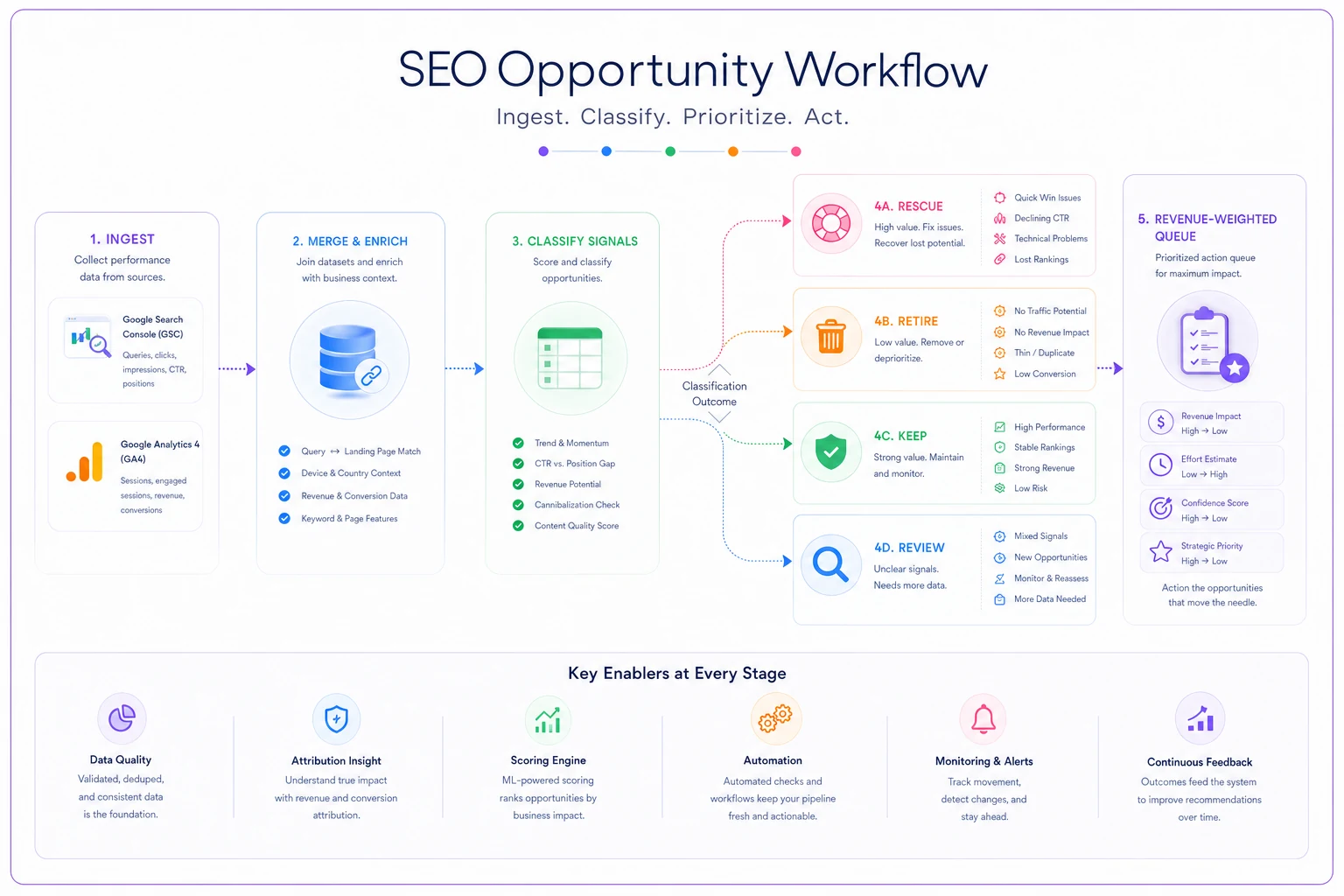
Use the visual to align the team on who owns each handoff and what a successful pilot looks like.
A quick checklist before you act
A short checklist to run through before you start retiring or rescuing pages.
-
[ ] GSC and GA4 joined at a consistent page-path key (trailing slashes, query params normalized)
-
[ ] Assisted/last-non-direct conversions included, not just last-click
-
[ ] Minimum impression threshold applied to filter noise
-
[ ] Revenue-per-click value is category-specific, not a site-wide average
-
[ ] KEEP list frozen before any retirement runs
-
[ ] Retirements routed as 301/410 deliberately — no lazy homepage redirects
-
[ ] A small pilot cohort tested before bulk retirement
Run this checklist as a gate before any bulk action — it prevents easy, costly mistakes.
When this is worth doing — and when it isn't
This whole exercise pays off when you have a lot of indexed pages relative to converting pages — large e-commerce catalogs, content-heavy publishers, programmatic landing pages. The signal-to-noise problem is real there, and the crawl/dilution cost of dead pages is measurable.
It's not worth the effort if you have fewer than a couple hundred pages. At that scale you can eyeball it, and the SQL overhead costs more than it saves. Same goes if your conversion tracking is unreliable — garbage conversion data will mislabel pages confidently, which is worse than not classifying at all. Fix the measurement layer first.
One group should flat-out avoid aggressive retirement: anyone in the middle of a migration or recent ranking volatility. Impressions and positions during instability aren't a stable basis for kill decisions. Wait until the dust settles, then run the classification against a clean 90-day window.
Closing thought
Indexing dark traffic detection isn't really about deleting pages. It's about refusing to treat "zero conversions" as a verdict when it's actually a question.
The impression-rich, conversion-poor pile on your site is a mix of hidden opportunity and genuine dead weight, and the only way to tell them apart is to join visibility, engagement, and all your conversion signals in one place — then let revenue impact decide the order you work through them. Do that, and your rescue list stops being guesswork and your retire list stops being a liability.
Indexing dark traffic detection isn't really about deleting pages. It's about refusing to treat "zero conversions" as a verdict when it's actually a question. The impression-rich, conversion-poor pile on your site is a mix of hidden opportunity and genuine dead weight, and the only way to tell them apart is to join visibility, engagement, and all your conversion signals in one place — then let revenue impact decide the order you work through them.
Ready to elevate your search rankings?
Join 5,000+ businesses using GoSeofy to increase organic traffic, optimize content, and outperform competitors online.