


Redirect storms hit differently than other SEO emergencies. Unlike a ranking drop or an indexation issue, redirect loops multiply their own damage—each broken redirect creates more confusion for bots, which triggers more redirects, which compounds fast. The worst part? Most teams don't realize they're in one until organic traffic falls off a cliff three days later.
It usually starts innocently enough. A developer pushes what looks like a small redirect rule update. Maybe it's a category restructure on an e-commerce site, or a subdomain consolidation for a SaaS company. Everything looks fine in staging. The redirect tester shows green checkmarks. Then production goes live and suddenly your server logs are showing 50,000 redirect chains per hour.
Understanding redirect storm patterns through log analysis
Redirect storms leave specific fingerprints in your server logs that distinguish them from normal redirect behavior. Normal redirects follow predictable patterns—a few hundred 301s per hour, maybe some spikes during launches. Storm patterns look completely different.
The first sign shows up in your status code distribution. Pull your nginx or Apache logs for the last 24 hours and run a basic status code count:
grep "301\|302\|303\|307\|308" /var/log/nginx/access.log | awk '{print $9}' | sort | uniq -c | sort -rn
During normal operations, 301 redirects might make up 2–3% of total requests. During a redirect storm, that number jumps to 15–40%. But the real diagnostic value comes from looking at redirect chains.
Chain detection requires following the referrer path. Here's a log query pattern that catches redirect loops:
awk '$9 ~ /30[1-8]/ {print $7" "$11}' access.log | sort | uniq -c | sort -rn | head -20
This shows you which URLs are bouncing traffic around. When you see the same URL appearing as both source and destination within a 5-request window, you've found a loop.
Timing patterns matter too. Redirect storms typically show exponential growth in the logs—hour one might have 500 extra redirects, hour two shows 2,000, hour six shows 15,000. This acceleration happens because search bots start hitting broken paths repeatedly, trying to understand the new structure.
Redirect taxonomy and business impact scoring
Type 1: Homepage redirect loops These are catastrophic. When your root domain starts bouncing between www and non-www versions, or between HTTP and HTTPS, you're bleeding traffic at maximum rate. A fashion retailer lost tens of thousands in revenue over a single weekend because their homepage redirect loop went unnoticed from Friday evening to Monday morning.
Stop losing visibility in search results.
GoSeofy helps you monitor, analyze, and improve your SEO performance with ease.
- Comprehensive keyword tracking
- Backlink quality monitoring
- Real-time SEO performance reports
No credit card required
Type 2: Category page chains E-commerce sites deal with these constantly. The /mens-clothing/ category redirects to /clothing/mens/, which redirects to /shop/mens-clothing/, which redirects back to the original. Each hop loses roughly 15% of crawl equity. Three hops and you're running at around 60% SEO capacity for those pages.
Type 3: Parameter loops These happen when tracking parameters interact badly with canonical rules. The URL /product?utm_source=google redirects to /product, which the CDN redirects back to /product?cdn=true, which triggers another redirect to strip parameters. Silent killers that mostly affect paid traffic.
Type 4: Mobile subdomain conflicts The m.site.com versus responsive design migration creates its own chaos. Mobile detection scripts redirect desktop users from m.site.com to www.site.com, but outdated detection logic sends them right back. Users literally can't access the site.
Type 5: Regional redirect storms International sites get hit when geo-targeting rules conflict. A user in Canada gets redirected from .com to .ca, but the .ca site redirects undefined regions back to .com. The user bounces between domains until their browser gives up.
Building a prioritization matrix for redirect storm triage
When you're in the middle of a redirect storm, trying to fix everything at once usually makes things worse. You need a clear prioritization framework based on actual business impact.
Start by pulling traffic value data for affected URLs. Connect your analytics API and match redirect URLs against last month's revenue data:
| URL Pattern | Monthly Sessions | Conversion Rate | Revenue Impact | Fix Priority |
|---|---|---|---|---|
| /checkout/* | 12,000 | 3.2% | $38,400 | Critical |
| /category/* | 45,000 | 1.1% | $14,850 | High |
| /blog/* | 28,000 | 0.3% | $2,520 | Medium |
| /about/* | 8,000 | 0.1% | $240 | Low |
Checkout pages might have less traffic than category pages, but their conversion impact makes them priority one. This seems obvious in hindsight, but during a crisis teams often chase the highest traffic numbers rather than the highest value pages.
Layer in crawl budget impact next. Pull your Search Console data and identify which sections get crawled most frequently. If Googlebot is burning 70% of its crawl budget on redirect loops in your /tags/ directory while your money pages go stale, you've created a secondary SEO problem on top of the original one.
Then factor in cascade risk. Some redirects trigger others. Fixing the root domain redirect might automatically resolve 20 subdirectory issues. Map those dependencies before you start making changes:
-
Domain-level redirects (highest cascade impact)
-
Subdomain redirects
-
Directory-level redirects
-
Individual page redirects
-
Parameter-based redirects (lowest cascade impact)
Fixing the root domain redirect might automatically resolve 20 subdirectory issues.
Safe remediation scripts with automated rollback triggers
The scariest part of fixing redirect storms is making changes to already-broken production systems. One wrong move and you've made things worse. That's why you need remediation scripts with built-in safety mechanisms.
#!/bin/bash # Redirect fix with automatic rollback on error spike # Backup current redirect rules cp /etc/nginx/redirects.conf /etc/nginx/redirects.backup.$(date +%s) # Baseline error rate BASELINEERRORS=$(tail -1000 /var/log/nginx/error.log | grep -c "redirect") # Apply fix cat > /etc/nginx/redirects.conf << 'EOF' # Your fixed redirect rules here EOF # Reload nginx nginx -s reload # Monitor for 60 seconds sleep 60 # Check new error rate NEWERRORS=$(tail -1000 /var/log/nginx/error.log | grep -c "redirect") # Rollback if errors increased by more than 20% if [ $NEWERRORS -gt $((BASELINEERRORS * 120 / 100)) ]; then echo "Error spike detected, rolling back" cp /etc/nginx/redirects.backup.$(date +%s) /etc/nginx/redirects.conf nginx -s reload exit 1 fi
For Apache systems, the approach changes slightly but the philosophy stays the same. Never push a redirect fix without a way to automatically undo it if metrics go sideways.
Tune rollback thresholds using historical traffic patterns before running remediation in production.
Monitor these metrics during remediation:
-
5xx errors (should decrease)
-
Redirect count (should decrease)
-
Time to first byte (should improve)
-
Successful page loads (should increase)
Rollback trigger thresholds need tuning based on your traffic volume. A site with 10,000 visits per hour can use tighter thresholds than one with 500.
Progressive fix deployment with canary testing
Rather than fixing all redirects at once, use progressive deployment. Start with 5% of traffic, monitor for 30 minutes, expand to 25%, then 50%, then full deployment.
This requires a load balancer or CDN that supports traffic splitting. Cloudflare Workers make this straightforward:
addEventListener('fetch', event => { event.respondWith(handleRequest(event.request)) }) async function handleRequest(request) { const url = new URL(request.url) // Canary logic - 5% of traffic gets fix const random = Math.random() if (random < 0.05) { // Apply redirect fix if (url.pathname === '/old-category/') { return Response.redirect('https://example.com/new-category/', 301) } } // Other 95% gets current (broken) behavior return fetch(request) }
Watch your canary deployment closely. If the 5% shows improved metrics after 30 minutes, expand to 25%. This staged approach limits the damage if your fix has unexpected side effects.
Here's a rough sequence for how a well-structured response actually unfolds:
-
Detect storm via log anomaly or alerting system
-
Pull status code distribution and identify chain depth
-
Score affected URLs by revenue impact
-
Back up current redirect rules
-
Deploy fix to 5% canary
-
Monitor for 30 minutes and check rollback metrics
-
Expand progressively
25% → 50% → 100%
-
Document every change made during the incident
Following this sequence won't guarantee a clean resolution every time, but it keeps you from turning a recoverable situation into a full outage.
Visual workflow for canary deployments:
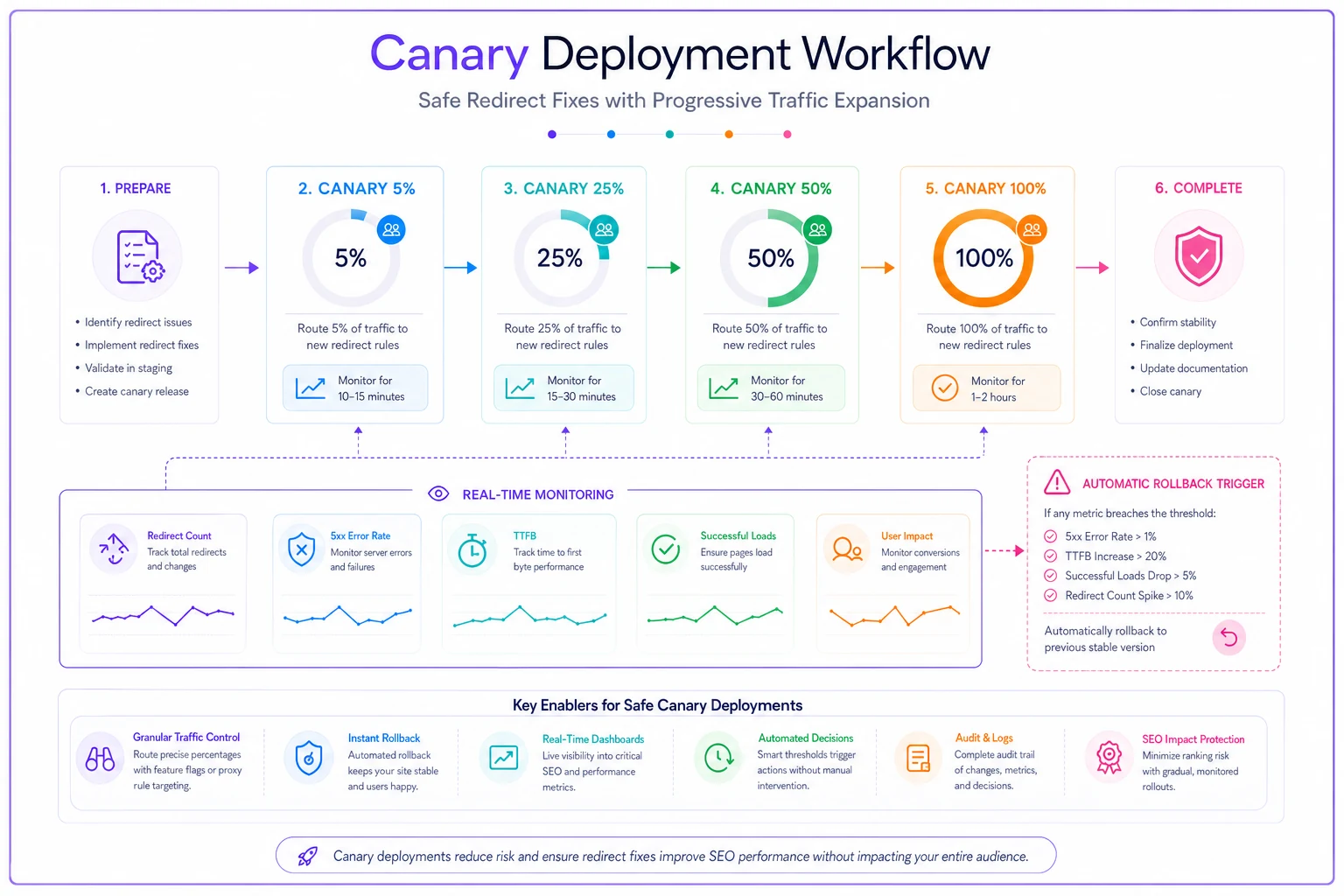
Watch your canary deployment closely and expand only when metrics remain stable at each stage.
Creating runbook documentation that actually works
Most redirect storm runbooks fail because they're written when everything's calm, then ignored during actual emergencies. Runbooks need to be scannable under pressure—not a wall of prose.
Structure yours with clear decision trees:
DETECTION PHASE (0–15 minutes)
-
Check status code distribution
Is 3xx traffic above 10% of total?
-
Identify affected sections
Run log query to find top 20 redirect URLs
-
Determine storm type
Loop, chain, or cascade?
-
Assess business impact
Pull revenue data for affected URLs
TRIAGE PHASE (15–30 minutes)
-
Stop the bleeding
Implement temporary redirect bypass for critical pages
-
Notify stakeholders
Use pre-written templates
-
Create tracking document
Log all changes for potential rollback
REMEDIATION PHASE (30–90 minutes)
-
Deploy fixes using canary method
-
Monitor key metrics every 10 minutes
-
Expand deployment progressively
-
Document lessons learned
Include specific commands and queries directly in the runbook. During a crisis, nobody wants to figure out the correct grep syntax on the fly. Have everything pre-written and tested before you need it.
Post-storm analysis and prevention systems
After you've stabilized the immediate crisis, the real work begins. Redirect storms rarely happen in isolation—they're usually symptoms of deeper operational problems.
A marketing agency running lead generation sites kept running into redirect storms every time they launched a new campaign landing page. The culprit was their deployment script, which automatically created redirects from "temporary" campaign URLs to permanent ones but never cleaned up old rules. After 18 months, they had 3,000+ redirect rules, many conflicting with each other.
The fix wasn't just cleaning up the backlog. They built a redirect audit system that runs weekly:
-
Count total redirect rules
-
Identify chains longer than 2 hops
-
Flag circular references
-
Alert on rules older than 90 days
-
Generate cleanup recommendations
Redirect infrastructure needs the same operational rigor as your database or server monitoring—not something you check only when things break.
Integrating redirect monitoring into your operational workflow
The best redirect storm triage happens before the storm actually hits. Modern operational software can catch redirect problems during routine monitoring rather than waiting for traffic to tank.
Set up automated monitoring that tracks:
-
Redirect rule count trends (sudden spikes indicate problems)
-
Chain depth distribution (most redirects should be single-hop)
-
Response time for redirected URLs (loops cause timeouts)
-
Bot crawl patterns (Googlebot hitting the same URL repeatedly signals issues)
These metrics fit naturally into existing SEO operational workflows. The same log analysis you run for crawl budget optimization can flag redirect anomalies. The monitoring you set up for migration tracking works for redirect storm detection too.
AI-powered operational platforms make this kind of monitoring realistic for smaller teams. Instead of manually checking redirect patterns every week, automated systems can scan logs hourly and alert on anomalies—cutting detection time from days to hours, and the operational overhead from hours per week down to minutes.
Making redirect storms survivable
Redirect storms will happen. The difference between a minor incident and a major crisis comes down to preparation and response time. Most businesses learn this after their first storm costs them real revenue.
The patterns are predictable enough that you can build defensive systems around them. Log monitoring catches chains as they form. Automated rollbacks prevent small problems from cascading. Progressive deployments limit blast radius. Clear runbooks turn panic into process.
The real insight from managing redirect storms repeatedly is that they're almost always caused by accumulation, not a single event. That one bad redirect rule wouldn't have caused a storm if there weren't already hundreds of others creating a fragile foundation underneath it.
Treating redirects as critical infrastructure—monitoring them like servers, testing them like code, documenting them like APIs—is what separates businesses that recover in hours from those that spend days untangling the mess.
Ready to elevate your search rankings?
Join 5,000+ businesses using GoSeofy to increase organic traffic, optimize content, and outperform competitors online.