


Most schema breaks quietly. Nobody gets an alert. A conference page keeps serving Event markup for a webinar that ended three weeks ago, an FAQ block shows an answer someone edited in the CMS but never re-validated, and Google either ignores it or flags the whole domain for stale structured data. By the time anyone notices, the rich result is gone and that page has been bleeding traffic for a month.
Events and FAQs are the two schema types where this happens most, and for a pretty specific reason: both pull from data that changes constantly and often includes fields humans type in by hand. Product schema is mostly generated from a catalog. Event and FAQ schema live at the intersection of automated feeds, marketing edits, and user-submitted content. That combination is exactly where a governance pipeline earns its keep — or where the absence of one turns into a slow leak.
This is about one narrow problem: how to move Event and FAQ structured data through a controlled flow — ingestion, validation, sampling, production — with moderation rules for the fields people touch, freshness checks that catch expiry, and rollback steps when something ships wrong.
Why Events and FAQs break differently than everything else
Schema health work usually treats all types the same: validate, monitor, fix. Events and FAQs don't really behave that way.
Event schema has a built-in expiry problem. startDate and endDate aren't just metadata — they determine whether the markup is even valid to show. An event that ended yesterday shouldn't be emitting Event schema at all, but nothing in a typical CMS enforces that. The page keeps rendering the JSON-LD because the template doesn't know the date passed. Google's guidance is explicit that past events shouldn't be marked up as upcoming, and it will quietly demote or drop those results.
FAQ schema breaks in the other direction. The data doesn't expire — it drifts. Someone updates the visible answer on the page but the JSON-LD is populated from a different field, so the rendered FAQ and the structured FAQ are saying two different things. Or a marketer pastes promotional language into an answer ("Sign up now for 20% off!") which violates FAQ content policies and risks the whole block being ignored.
The pattern that shows up repeatedly: teams build schema once, it validates clean on launch day, and then nobody accounts for the fact that the underlying data has a lifecycle the markup doesn't respect. A structured data governance pipeline exists to enforce that lifecycle.
The five-stage flow, and where each one actually fails
Here's the pipeline as it should run, stage by stage. The value isn't in the diagram — it's in knowing the specific failure mode at each handoff.
Stop losing visibility in search results.
GoSeofy helps you monitor, analyze, and improve your SEO performance with ease.
- Comprehensive keyword tracking
- Backlink quality monitoring
- Real-time SEO performance reports
No credit card required
-
Ingestion — Event data comes from a calendar system, ticketing platform, or manual entry; FAQ data comes from the CMS or a support knowledge base. Failure mode: a source changes its field names or format after a platform update and the ingestion job silently maps the wrong column. You end up with
endDatepopulated from a "registration deadline" field. -
Validation — Run the raw records against schema.org type requirements and Google's specific rich result rules, which are stricter. Failure mode: teams validate structure (is
startDatea valid date?) but skip semantics (isstartDatein the future?). Structurally valid, operationally dead. -
Sampling — Before pushing everything live, pull a representative sample across templates and check rendered output. Failure mode: sampling only the newest records. New records almost always look fine. It's the aged ones and the edge cases — multi-day events, recurring FAQs, non-English answers — that carry the problems.
-
Production — Deploy to live pages. Failure mode
shipping without a rendered-vs-source diff. The JSON-LD in the CMS looks right; what actually renders after JavaScript execution is missing two required fields.
-
Freshness monitoring — Continuous checks that catch expiry and drift after launch. Failure mode: there is no stage five. This is the one almost everyone skips, and it's the one that matters most for Events.
The jump most teams need to make is from treating validation as a one-time gate to treating freshness as an ongoing state. A page that passed validation in March is not a page that's valid in June.
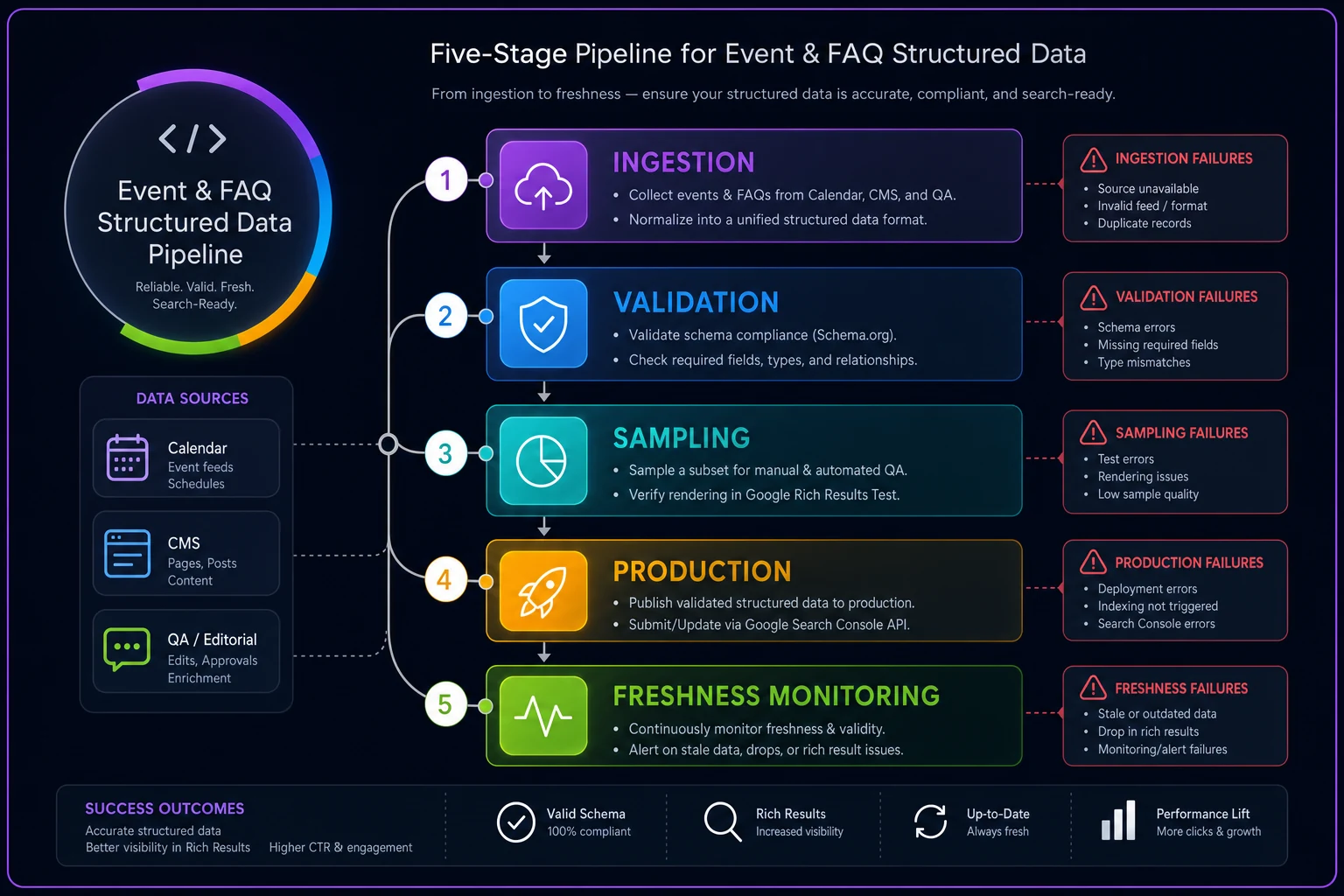
A concise diagram like this makes it easier to spot where handoffs are failing in your pipeline.
Moderation rules for the fields humans touch
The dangerous fields are the ones people edit directly: FAQ questions and answers, event names, event descriptions, and anything user-submitted like community event listings or Q&A.
-
Reject promotional or CTA language in FAQ answers — pattern-match for "buy now," "sign up," discount percentages, "limited time," phone numbers pushed as sales hooks. FAQ answers are supposed to be informational.
-
Strip or flag HTML that isn't on the allowed list — FAQ answers permit a limited set of tags. Pasted rich text from a doc often brings inline styles and scripts that break rendering.
-
Enforce a minimum answer length and reject duplicate Q&A pairs — thin or repeated FAQ entries are a spam signal.
-
Block past-dated events at submission — if a user submits an event with a
startDatealready in the past, reject it at the door rather than letting it flow through. -
Cap description length and screen for contact-harvesting patterns in user-submitted event listings.
-
Flag mismatches between visible content and structured content — if the answer field and the schema field diverge beyond a small threshold, hold for review.
The mistake here is putting moderation after production and cleaning up spam reactively. By then the bad markup has already been crawled. Moderation belongs upstream, at ingestion, as a gate — the same principle behind UGC moderation that prevents index bloat before it happens, where catching problems late compounds quietly.
Freshness checks: the part that actually protects Event traffic
Freshness is where Event schema either works or rots. The check is conceptually simple and operationally neglected.
Run a scheduled job — daily is enough for most sites — that scans every page emitting Event schema and compares endDate (or startDate for single-day events) against the current date. Three outcomes:
-
Future event → leave as-is, valid.
-
Event within a grace window (say, ended in the last 24–48h) → flag, because you may want to keep it briefly for post-event traffic before transitioning.
-
Past event beyond the window → the page should either stop emitting Event schema, redirect to a current equivalent, or transition to an archived state without the markup.
For FAQs, freshness means drift detection rather than expiry. Periodically diff the rendered visible answer against the JSON-LD answer. When they diverge, someone edited one and not the other. That's your alert.
| Check | Schema type | Frequency | What triggers action |
|---|---|---|---|
| Past-event scan | Event | Daily | endDate before today, past grace window |
| Rendered vs source diff | Event + FAQ | On deploy + weekly | Required field missing after JS render |
| Content-vs-schema drift | FAQ | Weekly | Visible answer ≠ structured answer |
| Policy re-scan | FAQ | On edit | Promotional language introduced post-launch |
| Field-mapping audit | Event | On source change | Ingestion column mapping shifted |
Start with a daily past-event scan; it's the lowest-effort check that prevents the most traffic loss.
The thing teams miss: freshness failures don't announce themselves in Search Console the way an error does. A dropped rich result from a stale event usually shows up as a gradual impression decline on that URL. If you're waiting for an error report, you'll never catch it.
Rollback steps when something ships wrong
You will ship a bad batch eventually — a source change corrupts a field, a moderation rule has a gap, a template update drops a required property across an entire category. The difference between a bad afternoon and a bad quarter is having rollback defined before you need it.
-
Freeze the pipeline. Stop new deploys the moment a systemic issue is confirmed. Don't debug on a live-updating target.
-
Identify blast radius. Which URLs, which schema type, which field. A single template usually maps to hundreds of pages — know the count.
-
Revert to last-known-good markup, not last-known-good page. You often want to keep content changes and only roll back the JSON-LD.
-
Re-validate the reverted state on a sample before re-enabling. Rolling back into a second broken state happens more than you'd think.
-
Request re-crawl on the highest-value affected URLs so the correction propagates faster than passive recrawl.
-
Log the root cause and add the missing check. Most schema incidents are a check that didn't exist yet.
This mirrors the discipline in any SEO operations playbook with clear SLAs and ticket templates — rollback isn't a heroic scramble, it's a documented step someone can run at 4pm on a Friday without paging the whole team.
Cross-schema governance: don't let Event and FAQ contradict each other
The subtle failure that catches larger sites: the same page carries multiple schema types that disagree. An event landing page has Event schema saying the event is upcoming, and an FAQ block on the same page with an answer saying "this event has concluded." Or breadcrumb and Event location fields point to different places after a venue change updated one but not the other.
Cross-schema governance means treating the page's structured data as one coherent statement, not a pile of independent blocks. The practical rule: when a shared fact changes — a date, a location, a price, a status — every schema type referencing that fact updates together, or none does. Wire the freshness job to check consistency across types on the same URL, not just within a single block.
This is where a light governance layer pays off. Not more tooling for its own sake — just a single validation pass that knows all the schema on a page and can hold a deploy when two types contradict. The teams that handle this well have one owner for the page's structured data as a whole, rather than a calendar admin owning Event and a content editor owning FAQ with nobody watching the seam between them.
When a full pipeline makes sense — and when it's overkill
Not every site needs this. If you publish a handful of static FAQs and run two events a year, a manual re-check on a calendar reminder is fine. Building ingestion and freshness jobs for that is effort you'll never recover.
-
Recurring or high-volume events pulled from a feed or ticketing system
-
User-submitted event listings or community-contributed FAQs
-
Multiple templates emitting the same schema types across many URLs
-
A history of rich results silently disappearing without an obvious cause
Who should not do this: small sites with hand-maintained, rarely-changing markup. The overhead outweighs the risk. Where it becomes non-negotiable: any site where structured data drives meaningful rich-result traffic and the underlying data has a lifecycle — which is exactly the Event and FAQ case.
Real scenario
A regional events publisher — mid-sized site listing concerts, workshops, and local meetups — was running Event schema pulled from three different organizer feeds plus a submission form where organizers could list their own events. On any given month they had somewhere around 400–500 active event pages.
No freshness checks. Past events kept emitting upcoming-event schema for weeks after they ended, and organizer-submitted descriptions occasionally carried promo links that tripped content policy. Their event rich results had been slowly thinning out over a couple of months, and impressions on event URLs were down noticeably without a clear culprit.
They added three things: a daily past-event scan that pulled expired listings out of Event markup, a moderation gate on the submission form that rejected past dates and promotional language before ingestion, and a rendered-vs-source check on deploy. Within roughly six to eight weeks, event rich results recovered across most of the active listings and impressions climbed back toward where they'd been. Nothing dramatic overnight — it was the steady kind of recovery that comes from the data finally matching its own markup.
The fix wasn't better schema. The schema was fine on day one. The fix was enforcing the lifecycle the data always had.
Event and FAQ schema fail because their data moves and their markup doesn't. A structured data governance pipeline is really just the machinery that keeps those two in sync — validation that checks semantics not just syntax, moderation that gates the fields people touch, freshness checks that respect expiry and drift, and rollback steps you defined before the bad batch shipped. Start with the freshness scan if you start with anything. It's the cheapest check to build and the one that quietly saves the most traffic.
Ready to elevate your search rankings?
Join 5,000+ businesses using GoSeofy to increase organic traffic, optimize content, and outperform competitors online.