



Soft 404s are sneaky because nothing looks broken. The page returns a 200 OK, the customer sees a layout, your CMS reports it as live. But Google looks at it, decides there's basically nothing there worth indexing, and files it under "Crawled – currently not indexed" or flags it as a soft 404 in the coverage report. No error page, no red flag in your logs, just slow decay.
On a small catalog you might catch one manually. On a store with 8,000 SKUs — where 900 of them are out of stock, discontinued, or auto-generated from a bad filter combination — you're never finding these by hand. That's the actual problem this post solves: detecting soft 404s across a large product catalog and fixing them at the template level, not one URL at a time.
What a soft 404 actually looks like on a product page
Forget the textbook definition. In real e-commerce, soft 404s almost always come from one of a handful of predictable template states:
-
Out-of-stock products where the "buy" section collapses and the page is left with a title, a breadcrumb, and a "notify me" box. Thin content, no real value.
-
Discontinued SKUs that still resolve to a live URL but show "This product is no longer available" — sometimes with a full layout, so it still returns 200.
-
Empty variant or filter pages like
/shoes?color=teal&size=14that match zero inventory but still render the category shell. -
Placeholder or pre-launch products that got pushed live before descriptions, images, or pricing were populated.
The part people miss: Google doesn't decide something is a soft 404 based on the HTTP status. It decides based on what the rendered content looks like relative to other pages it trusts. A product page that's 90% boilerplate navigation and 10% "sorry, unavailable" reads as empty. It doesn't matter that your server thinks the page is fine.
So the detection problem is really two problems glued together: find pages Google is treating as empty, and figure out which template state caused it.
Why GSC alone won't get you there
Google Search Console will tell you a URL is a soft 404. It won't tell you why, and it won't tell you about the ones it hasn't gotten around to flagging yet. The coverage report also samples and lags — you'll see a fraction of the real problem, days or weeks late.
Stop losing visibility in search results.
GoSeofy helps you monitor, analyze, and improve your SEO performance with ease.
- Comprehensive keyword tracking
- Backlink quality monitoring
- Real-time SEO performance reports
No credit card required
Server logs fill the other half of the picture. Logs show you what Googlebot actually requested and how often, which pages it's crawling repeatedly and which it's abandoned. When you combine the two, patterns show up that neither source reveals alone.
A typical example: GSC flags 240 product URLs as soft 404s. Logs show Googlebot hitting a different set of 1,100 out-of-stock product URLs at a declining crawl frequency, some dropping from daily to once every three weeks. Those 1,100 aren't flagged yet — but the crawl decay pattern says they're on the same path. You just found tomorrow's problem today.
If you've already set up log-file analysis for other reasons, this reuses most of that pipeline. The mechanics of parsing bot activity and joining it to URL metadata are the same ones covered in finding indexation blind spots with log-file analysis — soft 404 detection is essentially another query on top of that dataset.
The detection workflow, end to end
The goal is a single table where every product URL has both its GSC status and its crawl behavior, so you can segment by cause.
-
Pull the GSC coverage export via the API, filtered to product URL patterns. Grab status, last crawl date, and the specific label (soft 404, crawled-not-indexed, excluded).
-
Parse Googlebot log entries for the same URL prefix over the last 60–90 days. Extract URL, timestamp, response code, and user-agent. Verify it's actually Googlebot by reverse DNS — a surprising chunk of "Googlebot" traffic in raw logs is spoofed.
-
Join GSC data to a product feed export. This is the step people skip, and it's the most valuable one. Your product feed has stock status, price, variant relationships, and category. Now you can label each flagged URL by template state.
-
Compute crawl frequency trend per URL — average days between Googlebot hits, and whether that interval is growing. Growing interval combined with thin content is your pre-soft-404 signal.
-
Segment. Group flagged and at-risk URLs by cause
out-of-stock, discontinued, empty-filter, thin-description, orphaned. Each segment gets a different fix.
The join in step 3 changes the whole conversation. Without it you have a list of 240 bad URLs. With it you have "180 of these are out-of-stock products in three categories, 40 are discontinued, 20 are filter combos that never had inventory." Now you're fixing classes of pages, not individual URLs.
Below is a rough picture of how these stages connect:
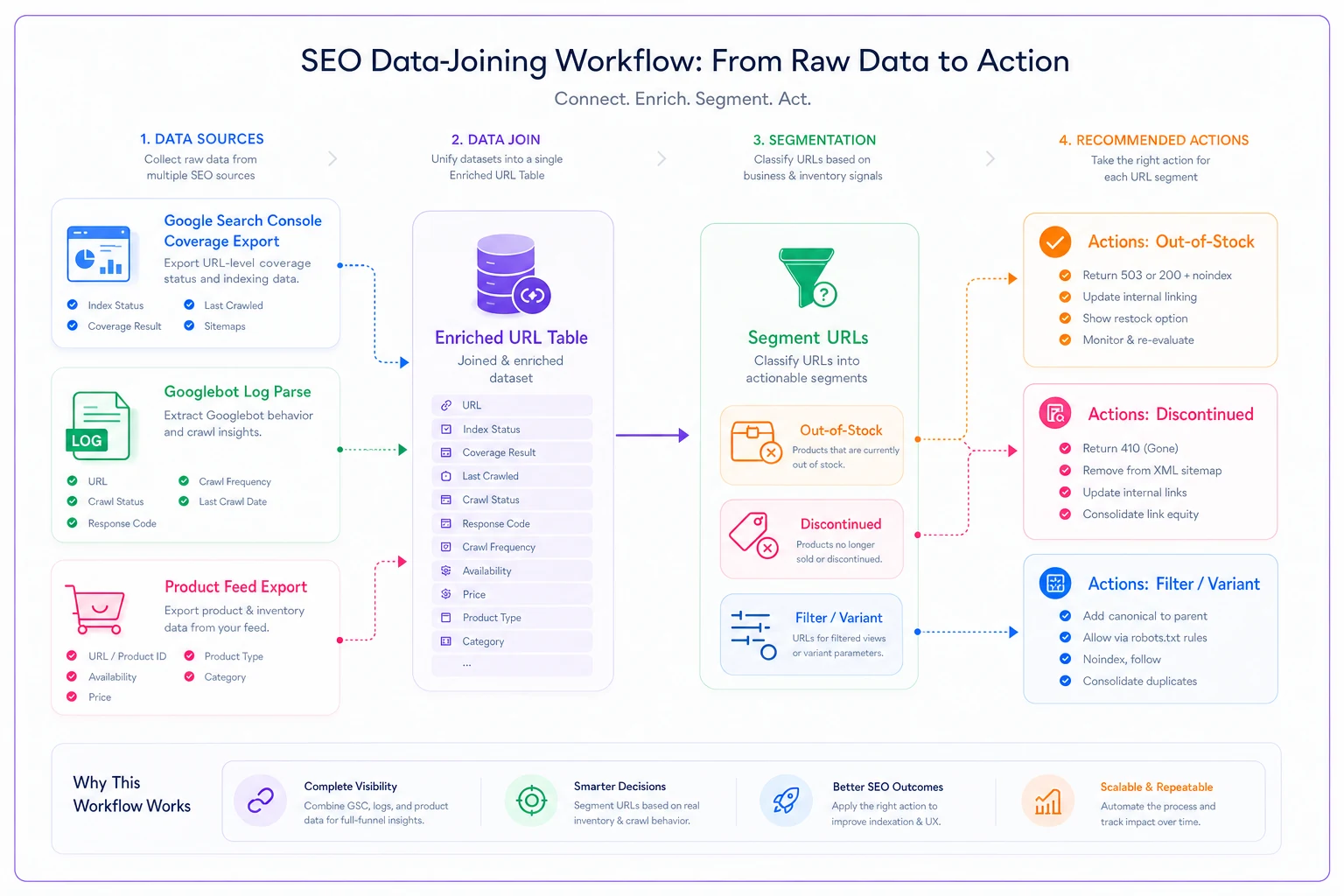
[GSC Coverage Export] ──────────────────────────┐ ▼ [Googlebot Log Parse] ──► [Join on URL] ──► [Enriched URL Table] │ [Product Feed Export] ──────────────────────────┘ │ [Segment by Cause] │ ┌────────────────────┼────────────────────┐ ▼ ▼ ▼ [Out-of-stock] [Discontinued] [Filter/Variant] │ │ │ ▼ ▼ ▼ [Keep indexed] [301 or 410] [404 or noindex]
Template fixes by cause
Once URLs are segmented, the fixes are mostly template logic — decisions your platform makes automatically based on product state. Here's how the common cases map:
| Template state | Wrong instinct | Actual fix |
|---|---|---|
| Temporarily out of stock, coming back | 404 or noindex it | Keep indexed, keep the description/reviews, add expected restock, surface related in-stock items |
| Discontinued, direct replacement exists | Leave it live at 200 | 301 to the replacement product |
| Discontinued, no replacement | Delete quietly | 301 to parent category, or 410 if it should truly disappear |
| Filter/variant with zero matches | Render empty shell at 200 | Return 404, or noindex + canonical to the base category |
| Thin auto-generated description | Ignore | Populate from attributes; if unfixable, noindex until content exists |
The single biggest mistake here is treating "out of stock" as "dead." A product that sells seasonally and goes out of stock for two months still holds ranking equity and still gets searched for. Noindexing it means you re-earn that ranking from scratch when it comes back. Keep the page indexed, keep the substantive content, and just change the availability signal. Google handles temporary unavailability fine when the rest of the page has real value.
The second mistake: bulk-301ing every discontinued product to the homepage. That's a soft-404-generator of a different kind — Google sees a hundred redirects landing on one irrelevant page and treats them as soft 404s anyway. Redirect to the closest relevant destination, not the easiest one.
Canonicalization heuristics for variant sprawl
Variants are where soft 404s multiply fastest. One product with color and size options can spawn dozens of crawlable URLs, most of them near-duplicates or empty combinations.
-
Canonical variants to a single product URL when they share a description and differ only by color/size. Don't let each
?color=be its own indexable page. -
Never canonicalize a zero-inventory combination to an in-stock one. That's a common auto-rule that backfires — you end up with a canonical target that doesn't match the URL's intent, and Google ignores the canonical.
-
Self-canonicalize only pages that can stand alone — enough unique content, real inventory, real search demand.
-
Treat faceted filter URLs as noindex by default, whitelisting only the filter combinations that map to genuine search demand (e.g. "waterproof hiking boots" as a real query, versus a random size+color mix nobody searches).
Worth internalizing: a canonical tag is a suggestion, and Google only respects it when the target genuinely resembles the source. If your heuristic points thin pages at unrelated strong pages just to consolidate, Google throws the canonical out and you're back to soft 404s — now with worse diagnostics because your tags are lying about the true state.
When cleanup beats fixing
Not every flagged page deserves a fix. Some product pages should simply go.
Fixing makes sense when: the product has search demand, will return to stock, has a natural replacement, or belongs to a category you're actively ranking in. These pages carry equity worth preserving.
Deletion or consolidation makes sense when: the SKU is permanently gone, has no replacement, gets near-zero impressions in GSC, and shows a dying crawl trend. Keeping it as a redirect to something loosely related adds noise. A clean 410, or folding it into a broader page, is the healthier call.
If you're looking at hundreds of dead SKUs, that's less a soft-404 fix and more a pruning project — and it's worth running with guardrails so you don't accidentally remove pages that still pull revenue. The staged approach in this content pruning program works well here: pilot on a small segment, watch the metrics, then scale.
One honest note on scope: if your catalog is under a few hundred products, skip the pipeline entirely. Export GSC, sort by status, fix them by hand in an afternoon. The tooling overhead isn't worth it at that scale.
A real scenario
A mid-sized outdoor gear retailer — roughly 6,000 active SKUs, heavy seasonal swing — was watching organic product traffic slide through the back half of the year with no obvious cause. Rankings for core terms held. Traffic didn't.
The join between GSC, logs, and their product feed made it obvious within a day. Around 800 out-of-stock seasonal products had been auto-noindexed by a plugin "to avoid thin content." Every winter, gear went out of stock, got noindexed, and lost its ranking. Every spring it came back and had to climb from nothing. On top of that, about 150 discontinued items were 301ing straight to the homepage, which Google was quietly treating as soft 404s.
The fixes were unglamorous. They stopped noindexing temporarily-out-of-stock products, kept descriptions and reviews live, added restock messaging, and rerouted the discontinued 301s to their nearest category or replacement. Faceted zero-result filters got a proper 404.
Recovery tracked with the next crawl and reindex cycle — roughly six to eight weeks. Product-page organic sessions recovered to somewhere near what they'd seen before the decay set in, and the seasonal "start from zero" pattern stopped repeating. The bigger win was structural: the same mistake stopped happening automatically every season.
Monitoring so it doesn't come back
Detection is a one-time cleanup. The recurring win is a monitoring setup that catches new soft 404s while they're still cheap to fix.
-
Weekly GSC coverage pull — alert if soft-404 or crawled-not-indexed counts on product URLs jump beyond a normal band.
-
Crawl-interval watch — flag product URLs whose average days-between-crawls is trending up. This is your earliest signal, ahead of GSC.
-
Stock-status change hook — when a product flips to out-of-stock or discontinued, confirm the template applies the right rule (keep-indexed vs 301 vs 410), not a blanket noindex.
-
Zero-result filter alert — log any facet URL returning no products and getting crawled.
-
Restock re-check — when products come back in stock, confirm they're indexed and their availability signal updated.
The one metric that tells you whether recovery is real: indexed product URLs with impressions, not just indexed count. A page can be indexed and still be functionally dead. Impressions trending back up on previously-flagged URLs is the signal that Google re-trusts the page.
Most teams run this manually at first, then wire a few alerts into whatever reporting tool they already have. It doesn't need to be complicated — the point is to stop finding out about soft 404 accumulation three months after it started.
Soft 404s on product pages almost never come from a broken page. They come from template logic that treats unavailable as worthless — noindexing seasonal stock, redirecting dead products to the homepage, letting empty filters render at 200. Detecting them at scale is a data-joining problem: GSC tells you what's flagged, logs tell you what's decaying, and your product feed tells you why. Once those three sit in one table, the fixes stop being 240 individual tickets and become a handful of template rules. Get the rules right once, add a monitoring watch, and the whole class of problem mostly stops recurring.
Ready to elevate your search rankings?
Join 5,000+ businesses using GoSeofy to increase organic traffic, optimize content, and outperform competitors online.