



Most schema problems don't announce themselves. A product page keeps its Product markup, the price updates in the visible HTML, and nobody notices the JSON-LD block is still advertising last quarter's price to Google. The page looks fine. Rich results look fine. Then one morning the price snippet disappears from search, or worse, Google shows a struck-through discount that hasn't existed for six weeks and support starts fielding "why is this cheaper on Google" tickets.
That gap — between what your page renders and what your structured data claims — is what nobody has a good handle on once you're past a few thousand URLs. You can't hand-check schema on 80,000 product pages. And the standard tools (Rich Results Test, the Schema Markup Validator) are single-URL, on-demand checkers. They tell you if one page is valid. They tell you nothing about whether 4% of your catalog silently drifted into conflict last week.
This post is about the actual mechanics of schema health monitoring at scale: how to sample intelligently instead of scanning everything, how to build heuristics that flag conflicts automatically, and how to prioritize remediation so you fix the pages that actually matter first.
Why schema breaks in ways validators never catch
Validators check syntax and required fields. That's a small slice of what actually goes wrong. In real operations, failures tend to cluster into three buckets, and only one of them shows up in a validator.
Missing schema is the easy one. A template ships without markup, or a CMS migration drops the JSON-LD injection on a page type. Validators catch this if you happen to test that page. At scale, entire page categories can lose schema and you won't know unless you're sampling across templates.
Conflicting schema is nastier because the markup is technically valid. The JSON-LD says "price": "49.99" while the visible page shows $39.99 after a sale went live. The availability field says InStock while the buy button is greyed out. The aggregateRating claims 4.8 from 210 reviews but the review widget on the page loads 12. Every one of those passes a validator. Every one is a policy risk and a trust problem, and Google increasingly ignores — or penalizes — markup that contradicts on-page content.
Stale schema is the silent killer. Data that was correct when published and just rotted over time. Event dates that already passed. datePublished that never updates on evergreen pages you keep refreshing. Author schema pointing to someone who left two years ago. Offer expiration dates in the past. None of it throws an error. All of it degrades eligibility.
Something worth internalizing: the more dynamic the field, the faster it goes stale. Price, availability, ratings, and event dates are the usual suspects. Static fields like brand or sku rarely drift. That single observation should shape where you point your monitoring — you don't need to re-check the brand name every day, but price conflicts deserve a tight loop.
The sampling vs full-scan tradeoff (and why hybrid wins)
The instinct when you first take schema seriously is to crawl and validate every single URL, every day. On a large catalog that's expensive, slow, and mostly wasteful — 95% of your pages didn't change and won't have new schema problems.
Stop losing visibility in search results.
GoSeofy helps you monitor, analyze, and improve your SEO performance with ease.
- Comprehensive keyword tracking
- Backlink quality monitoring
- Real-time SEO performance reports
No credit card required
The opposite instinct — sample a random few hundred pages weekly — is cheaper but misses concentrated failures. If a single template breaks and it only powers 3% of your pages, a small random sample might not touch it for weeks.
| Approach | Coverage | Cost | Best for | Blind spot |
|---|---|---|---|---|
| Full scan (everything, always) | Total | Very high | Small sites (<5k URLs) | Wastes budget re-checking static pages |
| Random sampling | Statistical | Low | Estimating overall health % | Misses concentrated template failures |
| Stratified sampling | Per-segment | Medium | Catching template-level drift early | Needs good segmentation upfront |
| Hybrid (stratified sample + targeted full scan) | High where it matters | Medium | Large catalogs with mixed value | Requires prioritization logic |
The hybrid model that actually holds up looks like this:
-
Full-scan your highest-value pages continuously — the top revenue URLs, the pages driving the most rich-result clicks. If a page earns real money, you can afford to check its schema every crawl.
-
Stratified sample everything else, grouped by template. Instead of random URLs, you sample n pages per template per run. That way a broken template surfaces from a handful of sampled pages, not from luck.
-
Trigger full scans on change signals — when a template ships, a CMS deploy lands, or a segment's rich-result impressions drop in Search Console, you full-scan that segment on demand.
The key insight is that stratification by template is far more useful than stratification by category or traffic alone. Schema is generated by templates. Failures propagate by template. Sample the way the bugs actually spread.
Conflict-detection heuristics that don't drown you in noise
Detecting a conflict means comparing two sources: what the structured data claims versus what the page (or your source of truth) actually says. The trick is doing this without generating thousands of false positives that everyone learns to ignore.
-
Price delta check. Compare
offers.pricein JSON-LD against the rendered price in the DOM. Flag when they differ by more than a rounding tolerance. Most damaging when the schema price is lower — that's the one that triggers a struck-through-price violation. -
Availability mismatch. Cross-check
availabilityagainst inventory state or the buy-button status.InStockschema on an out-of-stock page is both a conversion problem and a trust signal issue. -
Rating count divergence. Compare
aggregateRating.reviewCountagainst the number of reviews actually rendered on the page. A 10x gap almost always means the schema is pulling from a stale or wrong data source. -
Date sanity checks. Flag any
Eventwith a start date in the past, anyOfferwithpriceValidUntilalready expired, and anydatePublishednewer thandateModified. -
Orphaned entities. Markup referencing an author, brand, or organization whose entity page 404s or no longer exists.
-
Template consistency drift. Within a single template, flag pages whose schema shape differs from the template norm — an extra field, a missing one, a different
@type. This catches partial deploys and one-off manual edits gone wrong.
Number six saves the most cleanup time by a wide margin. When you baseline what a template's schema should look like, any deviation becomes a signal. A page that suddenly has a different field structure than its 4,000 siblings is almost always a bug, not an intentional edit.
Baseline each template's canonical schema shape and alert on structural deviations rather than individual field mismatches to reduce noise.
On tolerances: set them deliberately. A price that differs by one cent is probably a formatting artifact. A reviewCount off by two might be caching lag. Tune thresholds until your flagged issues are worth a human's attention — a monitoring system that cries wolf gets muted, and a muted system is worse than none because it creates false confidence.
Prioritizing by page value, not by page count
You'll never fix every flagged issue, and you shouldn't try. Fifty stale datePublished fields on low-traffic blog posts matter far less than one price conflict on a page pulling 40,000 impressions a month.
A lot of teams go wrong here — they sort schema issues alphabetically or by error type and start at the top. That means someone spends Tuesday fixing markup on pages nobody visits while a revenue page bleeds rich results.
-
Traffic/impressions weight — how much search visibility does this URL have?
-
Revenue weight — does this page convert, or feed conversion?
-
Rich-result dependency — is this page currently earning an enhanced result that the conflict could remove?
-
Severity of the issue — a policy-violating price conflict outranks a cosmetic stale date.
Multiply those and sort descending. The top of that list is where you spend limited remediation hours. Everything below a threshold goes into a batch queue for template-level fixes rather than one-off attention.
The most useful dashboard view isn't "all schema errors." It's "high-value pages with active conflicts," filtered to segments earning rich results right now. That's the view that ties schema health to money, and it's the one that gets budget approved when you need engineering time.
Remediation playbooks: turning alerts into closed tickets
Detection without a resolution path is just a nicer way to feel anxious. Every recurring conflict type should have a playbook so the fix doesn't require re-deciding the approach each time.
Here's a concise remediation workflow you can follow for recurring conflicts:
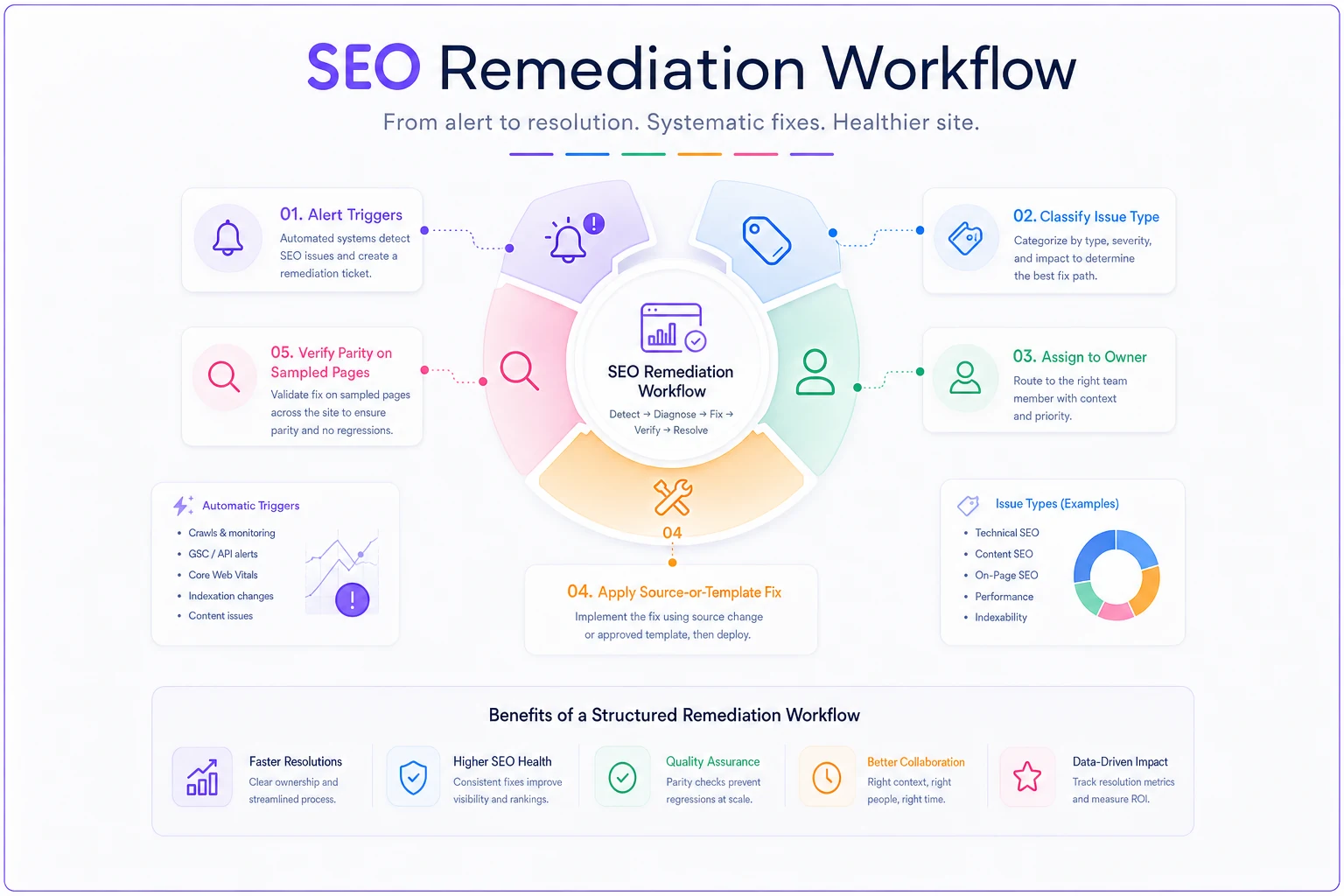
-
Price conflict → Root cause is usually a caching or feed-sync delay between the pricing service and the schema generator. Fix at the data source, not the template. Owner: whoever owns product data. Verify: re-fetch and confirm DOM/JSON-LD parity.
-
Stale event dates → Root cause is manual entry with no expiration logic. Fix: add auto-expiry or noindex-on-past-date rules to the event template. Owner: dev. Verify: confirm past events drop from eligibility.
-
Rating count divergence → Root cause is schema pulling from a different review store than the widget. Fix: point both at one source. Owner: dev + data. Verify: counts match on sampled pages.
-
Template shape drift → Root cause is a partial deploy or manual edit. Fix: redeploy the canonical template to affected URLs. Owner: dev. Verify: re-baseline the template.
Notice how many of these fix at the source or template level, not per-page. When one bad template breaks 4,000 pages, you write one ticket, not 4,000. Prioritization tells you which pages hurt most; playbooks tell you to fix the template that generated all of them.
If you're formalizing this across a team, the same ticketing discipline that keeps broader SEO work sane applies here — clear owners, SLAs by severity, and templates so nobody reinvents the fix. There's a fuller treatment of that operating model in Scale SEO operations without chaos: an ops playbook with SLAs, ticket templates and onboarding that maps cleanly onto schema remediation.
A real scenario
An outdoor gear retailer with roughly 30,000 product URLs was seeing product rich results flicker in and out of search with no obvious pattern. Nobody had touched the schema in months, so it wasn't a deploy issue.
Stratified sampling by template turned up the culprit fast. One template — powering about 2,600 sale-eligible products — was injecting the original price into offers.price while the page rendered the discounted price. Every one of those pages passed the Rich Results Test individually. But Google was catching the mismatch across the segment and pulling eligibility intermittently.
The fix was a single data-source change: point the schema generator at the same price field the front end used. After redeploy and re-crawl, the price-conflict flags on that segment dropped from a few thousand to near zero, and product rich results on those pages stabilized within about two weeks. One ticket, thousands of pages fixed, because the detection pointed at the template instead of the symptoms.
When this level of monitoring makes sense — and when it doesn't
It makes sense when:
-
You're past roughly 10,000 URLs and rely on rich results (products, recipes, events, jobs, reviews).
-
You have dynamic fields — price, availability, ratings, dates — that change without touching the template.
-
You deploy frequently and template changes are a real source of risk.
It's overkill when:
-
You run a small site where a monthly manual spot-check covers you.
-
Your schema is entirely static — a services page with
Organizationmarkup that never changes doesn't need daily surveillance.
Who should skip it entirely: brand-new sites still figuring out their content model. Nail your templates and your data sources first. Monitoring drift is pointless when the thing you'd monitor isn't stable yet.
Making it trustworthy
Schema monitoring is only as good as the data feeding it. If your comparison of "what schema says" versus "what's true" pulls from a stale export or a mislabeled feed, you'll chase phantom conflicts and miss real ones.
The comparison layer needs the same reliability discipline you'd apply to any reporting pipeline — known sources, clear ownership, alerting when a source goes quiet. The principles in SEO data observability: lineage, ownership and alerts to trust GSC/GA joins apply directly here: if you can't trust the inputs, the health dashboard is just confident guessing.
Wrapping up
Schema doesn't fail loudly. It drifts — a price here, an availability flag there, a template that quietly diverges after a partial deploy. On a large site, the only way to stay ahead of it is to stop treating schema as a one-time setup task and start treating it as something with a health status you actively watch.
The approach that holds up: full-scan the pages that earn money, stratified-sample everything else by template, run heuristics tuned tight enough that flags mean something, prioritize by page value instead of alphabetical error lists, and keep a short playbook for each recurring conflict so fixes happen at the source. Do that, and the next silent price mismatch surfaces from a sampled page on a Tuesday — long before it costs you a rich result on the pages that pay the bills.
Schema doesn't fail loudly. It drifts — a price here, an availability flag there, a template that quietly diverges after a partial deploy. On a large site, the only way to stay ahead of it is to stop treating schema as a one-time setup task and start treating it as something with a health status you actively watch.
The approach that holds up: full-scan the pages that earn money, stratified-sample everything else by template, run heuristics tuned tight enough that flags mean something, prioritize by page value instead of alphabetical error lists, and keep a short playbook for each recurring conflict so fixes happen at the source. Do that, and the next silent price mismatch surfaces from a sampled page on a Tuesday — long before it costs you a rich result on the pages that pay the bills.
Ready to elevate your search rankings?
Join 5,000+ businesses using GoSeofy to increase organic traffic, optimize content, and outperform competitors online.