


Launch day is where good SEO plans quietly fall apart. Not because teams don't know what to do, but because when something breaks at 9:47am during a redesign push, nobody can remember who owns the redirect map, what the rollback threshold is, or who's supposed to tell the VP of Marketing that organic traffic just dropped 30%. Everyone starts Slacking each other. Someone screenshots Search Console. Two hours pass before anyone makes a decision.
A risk register fixes this. Not the bloated enterprise PMO kind with forty columns nobody reads — a tight, SEO-specific one you build once and reuse for every launch. It pre-maps the failures you already know are possible, scores them, assigns owners, defines the exact conditions that trigger a rollback, and includes the messages you'll send when things go sideways.
This post walks through how to build that register so it actually gets used, not filed.
Why launches fail at the coordination layer, not the technical layer
Most launch disasters aren't caused by unknown problems. They're caused by known problems that nobody was watching for, or that got spotted late and then stalled in a decision vacuum.
Think about the typical failure modes on a big release — a site migration, a template redesign, a CMS swap, a new faceted navigation rollout. Redirects break. Canonicals flip. A noindex tag sneaks into a global template. Hreflang clusters desync. Page speed tanks because someone shipped an unoptimized hero video. None of these are mysterious. Any decent SEO could list them in two minutes.
The problem is that during launch day, attention is scattered. The dev team is watching error rates. The content team is QA'ing copy. The SEO is usually buried in Search Console or a crawl tool, and by the time they surface a red flag, the release has been live for three hours and the "should we roll back?" conversation turns into a committee meeting.
A risk register collapses that gap. It turns "something feels wrong" into "risk R-07 just tripped its threshold, owner is Dani, rollback gate is active, here's the pre-written escalation message." Decisions get faster because the thinking happened before the chaos.
Start with the failure inventory, not the template
Before scoring anything, write down every way the launch can hurt organic performance. Be specific to this release. A generic list is useless.
Stop losing visibility in search results.
GoSeofy helps you monitor, analyze, and improve your SEO performance with ease.
- Comprehensive keyword tracking
- Backlink quality monitoring
- Real-time SEO performance reports
No credit card required
-
301 redirect chain breaks or loops on high-traffic URLs
-
Legacy URLs returning 404 instead of redirecting
-
Global
noindexornofollowinjected via template or robots directive -
Canonical tags pointing to staging or to the wrong canonical target
-
XML sitemap pointing to old URL structure
-
Core Web Vitals regression from new JS bundle or unoptimized media
-
Structured data stripped or malformed in the new templates
-
Internal links still pointing to pre-migration paths
-
Robots.txt accidentally blocking CSS/JS or whole directories
-
Analytics/GSC tracking tags dropped, breaking your ability to even see the damage
That last one matters more than people give it credit for. If your measurement breaks, you're flying blind during the exact window you most need visibility. Treat tracking continuity as a first-class risk, not an afterthought.
Prioritize the inventory items that map directly to revenue or indexing visibility first.
The point of the inventory is coverage. You can't score or assign a risk you never wrote down. Spend real time here — it's the foundation everything else sits on.
Scoring: likelihood × impact, but keep it honest
Once you have the inventory, score each risk. The classic approach is a 1–5 scale for both likelihood and impact, multiplied into a priority score. That works fine, but two things wreck these scores in practice:
People inflate likelihood out of anxiety. Everything feels like a 5 the week before launch. Anchor your scores to history. If your redirect QA process has caught chain breaks on the last three launches, the residual likelihood after QA is lower, not higher.
Impact gets scored on traffic, not revenue. A 404 on a blog post that gets 40 visits a month is not the same as a broken canonical on your top ten commercial category pages. Score impact against business value where you can. Tie it to pages that actually convert.
Here's a workable scoring grid for a mid-sized e-commerce migration:
| Risk ID | Risk | Likelihood (1–5) | Impact (1–5) | Score | Priority |
|---|---|---|---|---|---|
| R-01 | Redirect breaks on top category URLs | 3 | 5 | 15 | Critical |
| R-02 | Global noindex in new template | 2 | 5 | 10 | High |
| R-03 | CWV regression (LCP) from new bundle | 4 | 3 | 12 | High |
| R-04 | Canonical pointing to staging domain | 2 | 4 | 8 | Medium |
| R-05 | GSC/GA tags dropped post-deploy | 2 | 4 | 8 | Medium |
| R-06 | Structured data malformed on PDPs | 3 | 2 | 6 | Medium |
| R-07 | Sitemap still referencing old URLs | 4 | 2 | 8 | Medium |
Notice R-03 scoring high purely on likelihood — new JS bundles regress LCP constantly, so even a moderate impact earns attention. And R-01 sitting at the top because a broken redirect on money pages is the single most expensive thing that happens on launch day.
Don't overthink the math. The score exists to sort, not to be precise. What matters is that the top five are genuinely the top five.
Owner assignments: one name, not a team
The single biggest reason risk registers rot is shared ownership. "The dev team owns redirects" means nobody owns redirects at 9:47am. Assign one human name to every risk. That person doesn't have to fix it alone, but they're the one who confirms the check, raises the flag, and makes the first call.
-
R-01 Redirect breaks — Owner
Marcus (SEO lead). Backup: Priya (platform eng).
-
R-02 Global noindex — Owner
Priya (platform eng). Backup: Marcus.
-
R-03 CWV regression — Owner
Sam (front-end). Backup: Priya.
Two rules that actually save you:
-
The owner must have access to the data that proves the risk tripped. No point assigning a redirect risk to someone who can't pull the logs or run the crawl.
-
Name a backup for every critical risk. Launches happen when people are on PTO, in meetings, or just not looking at Slack. The backup isn't optional.
This is the same discipline that makes day-to-day SEO work scale. If you haven't formalized ownership across your broader operations yet, the ideas in scaling SEO operations without chaos carry over directly — a launch register is just that same ownership model compressed into a single high-stakes day.
Pre-deployed rollback conditions: decide the thresholds while you're calm
This is the part most teams skip, and it's the part that saves you. A rollback condition is a pre-agreed, measurable threshold that — if crossed — triggers a rollback without a debate.
-
R-01 If more than 5% of top-100 revenue URLs return non-200 or redirect-chain >2 hops, within 60 minutes of deploy → roll back redirect layer.
-
R-02 If any global template renders
noindexon indexable page types → immediate full rollback, no discussion. -
R-03 If LCP on key templates exceeds 4s at p75 in field/lab monitoring sustained for 2 hours → roll back front-end bundle.
-
R-05 If GSC/GA tag firing drops below 90% of baseline → halt further rollout, restore tracking before continuing.
Notice R-02 has no tolerance. Some risks are catastrophic enough that the threshold is "if it happens at all." A global noindex can deindex your whole site within days. There's no acceptable amount of that.
Define what gets rolled back too, not just whether. A full rollback is expensive and sometimes worse than a targeted fix. For a deeper treatment of staged rollbacks and 90-day monitoring, the technical SEO migration playbook with rollback criteria covers the monitoring windows that tell you whether a rollback actually worked.
Communications templates: write the hard messages in advance
When a risk trips, the clock is running and nobody has the bandwidth to craft a careful message. So they either over-alarm ("SITE IS DOWN") or under-communicate — silence while they panic-debug. Both are bad.
Pre-write three types of messages into the register:
1. Internal escalation (to the decision-makers who can approve a rollback):
> 🔴 Launch risk R-01 tripped at [time]. 7% of top revenue URLs returning 404. Rollback gate active. Recommending redirect-layer rollback now. Owner: Marcus. Need go/no-go from [name] within 15 min. Thread here: [link]
2. Cross-team status (to everyone watching the launch):
> Heads up — we've hit a redirect issue on category pages (R-01). SEO + platform eng engaged. Rollback being evaluated. No action needed from other teams yet. Next update in 20 min.
3. Stakeholder "all clear" or "resolved":
> Update on R-01: redirect layer rolled back at [time]. Top URLs returning 200. Monitoring traffic recovery over next 24h. Root cause: [X]. Post-mortem scheduled.
The value here isn't the wording — it's that the structure forces clarity: what tripped, what's the impact, what's the recommendation, who decides, by when. Fill-in-the-blank beats blank-page-under-pressure every single time.
Keep these templates in the same document as the register. Separate files get lost.
A real scenario: mid-market retailer, platform migration
A home goods retailer doing roughly $4M–$5M annually in organic-driven revenue migrated from a legacy CMS to a headless setup. First attempt, no register: they launched, a template-level canonical bug pointed about 1,200 product pages at a single parent category, and nobody caught it for nine days. Rankings on those products slid, and they lost an estimated $18k–$22k in organic revenue over the recovery period — plus three weeks of re-crawling to claw it back.
Second migration, eight months later, they ran it off a register. Fifteen mapped risks, scored, owned, with rollback gates. On deploy, R-04 (canonical pointing to staging) tripped within about 40 minutes — the owner spotted it in a scheduled crawl, the pre-written escalation went out, and the decision to roll back the canonical config took under 20 minutes total. The exposure window was less than an hour instead of nine days.
The difference wasn't skill. Same team, same tools. The difference was that the second time, the decision-making was done in advance. The register turned a potential multi-week recovery into a Tuesday-morning non-event.
The launch-day execution workflow
How the register actually runs on the day:
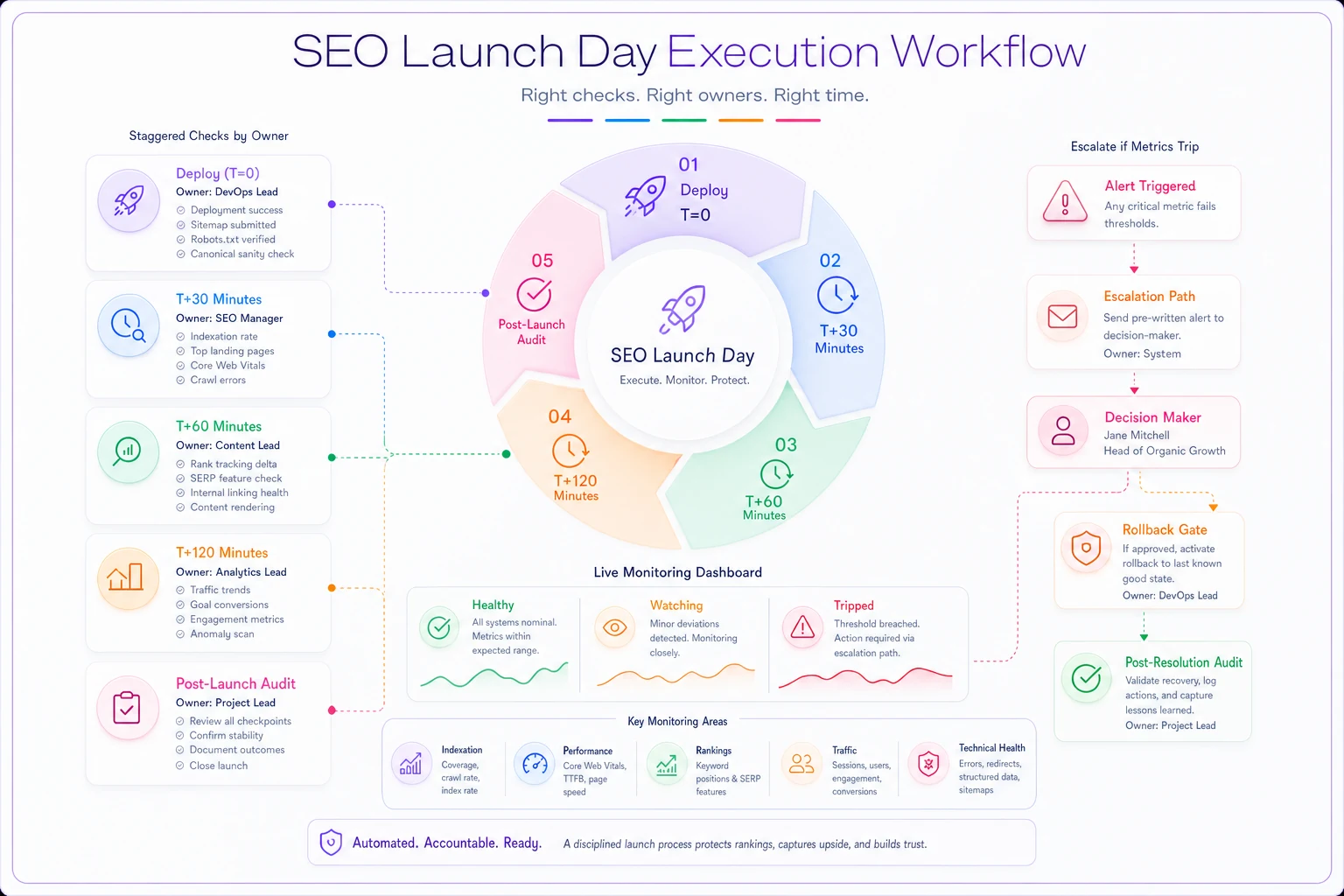
This workflow visual summarizes the launch-day checks and decision gates.
-
T-minus 1 day Owners confirm they have access to their monitoring data. Backups confirmed. Rollback procedures tested in staging where possible.
-
Deploy Each owner runs their check against their assigned risk on a staggered schedule — some checks run immediately (noindex, robots.txt), others at 30/60/120 minute marks (CWV, traffic signals).
-
Monitoring window Owners log status next to each risk — green, watching, or tripped. One person (launch coordinator) owns the master view.
-
If a risk trips Owner compares against the rollback threshold. If crossed, they fire the pre-written escalation. If not, they move to "watching" and set a recheck time.
-
Decision Named decision-maker gives go/no-go within the pre-agreed window. No open-ended debate.
-
Post-resolution Status moves to resolved, "all clear" message sent, root cause logged for the post-mortem.
The quiet benefit of this flow: it's auditable. After the launch, you can see exactly which risks tripped, how fast, and whether your thresholds were set right. That feedback loop makes the next register sharper.
When a formal register makes sense — and when it's overkill
This isn't for every change you push. A copy tweak or a single new landing page doesn't need fifteen scored risks.
Build a register when:
-
You're migrating platforms, domains, or URL structures
-
You're rolling out a global template change
-
You're launching faceted navigation or large new page-type sections
-
A launch touches pages representing a meaningful chunk of organic revenue
-
Multiple teams (SEO, eng, content) have to coordinate on the same release
Skip the full register when:
-
The change is isolated, low-traffic, and easily reversible
-
One person owns the entire change end to end
-
There's no realistic indexing or revenue downside
Who should be careful with this: very small teams where one person wears every hat. The register still helps — but keep it to five risks, not fifteen. The overhead of a heavy register can itself become a reason launches stall. Scale the document to the actual stakes.
Reuse and refine: the register is a living asset
The first register you build takes real effort. Every one after is a copy-paste-and-adjust job. Keep a master template with your standard risk inventory, your scoring grid, and your message templates. For each launch, clone it, delete irrelevant risks, add launch-specific ones, reassign owners, and re-tune thresholds.
After every launch, spend 20 minutes updating the master: Did a risk you didn't map trip anyway? Add it. Was a threshold too sensitive and caused a false alarm? Loosen it. Did an owner lack the access they needed? Fix the access note. Over a handful of launches, your register becomes a genuinely accurate map of how your site breaks — which is far more valuable than any generic best-practices checklist.
That accumulation is the real payoff. The register isn't just a launch-day tool. It's institutional memory about your own failure patterns, written down where the next person can use it. Most SEO knowledge lives in people's heads and walks out the door when they leave. A good risk register keeps it on the shelf.
The teams that launch cleanly aren't the ones with no risks. They're the ones who decided — ahead of time, while nobody was panicking — exactly what they'd do when the risks showed up.
The teams that launch cleanly aren't the ones with no risks. They're the ones who decided — ahead of time, while nobody was panicking — exactly what they'd do when the risks showed up.
Ready to elevate your search rankings?
Join 5,000+ businesses using GoSeofy to increase organic traffic, optimize content, and outperform competitors online.